Your new post is loading...

Robin Good's insight:
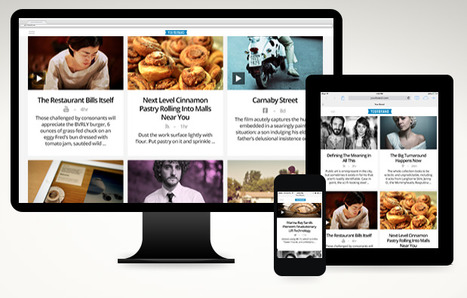
Each day of the week has a color and a theme. Each edition of VSL lists three unique resources on that theme. An excellent and well tested example of curation at work, VLS is alive since 2006 and the quality of its curation work allow for a discrete sponsorship presence to support this unique quality publication. Check it out now. Free to use: http://www.veryshortlist.com/ Archives: http://www.veryshortlist.com/lists/ Curated by: Alexa Jaccarino
Robin Good's insight:
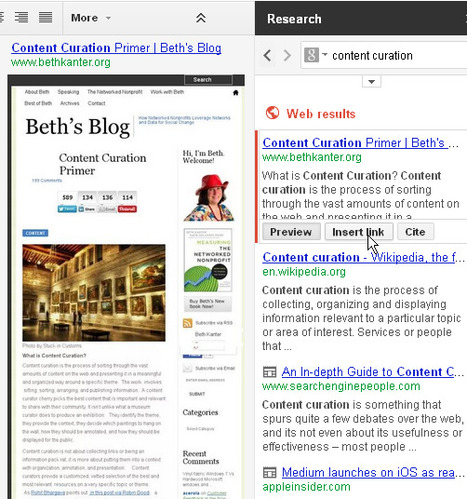
Google Research is a little-known sidebar available inside Google Drive documents and presentations which allows you to do just-in-time Google searches and to easily curate relevant results, including images, videos, text excerpts, links with full automatic attribution references, into the document or presentation you are preparing. The Google Research sidebar facility can be called at anytime up by simply going to the Tools menu and selecting "Research" or by selecting any word in your text and then typing Ctrl+Alt+Shft+I. Once in view, the mini Google Research sidebar, is ready to search across not just the Google standard web results, including news, images, videos and Google Scholar databases, but is also able to instantly filter and sort for you relevant Quotes, Dictionary items, as well as stuff from your own Google Drive documents and tables. To identify more rapidly relevant resources inside this search sidebar, Google offers the option to "preview" any result, by opening an additional sidebar showcasing a resized view of the web page in question). Once identified a relevant resource you can either drag and drop it right into your open Google document / presentation (great for images which will also automatically credit)*, or "insert the resource as a link", or "cite" it (by being able to select between MLA; APA and Chicago citation formats). I have found the Google Research Tool extremely useful, handy and simple to use. If you are researching, writing or curating any kind of article, presentation or report in Google Drive, I highly recommend you try it yourself and let me know what you think of it. Free to use. *I am not suggesting to freely re-use images of others simply because they are accessible via the Google Research Tool. Generally, It is not a good idea to re-use other people images without appropriate authorization from the author.
wanderingsalsero's curator insight,
March 28, 2014 7:49 PM
I think this is a very intriguing idea. What I wonder is... is it possible to 'meld' on GD acct with another?
Elizabeth Bowden's comment,
April 2, 2014 9:19 AM
Unfortunately, one must log in to their Google account to see your article.
Robin Good's insight:
Many content curation startups, and many of the people using curation tools will probably not like what I have written in this article, but I have a hard time behaving as if I couldn't see a cardboard façade that's been sold for a real destination. Content Curation has been hijacked and has been sold as a cheap and easy solution for content marketers plagued by the growing problem of getting greater attention from their readers and therefore of how to produce more quality content within tighter and tighter time constraints. Worse yet, if you confront content marketers with the idea that what they are encouraging people to do, does in fact create more "noise" and confusion than we already have, content marketers will counter with statistical data demonstrating that this "curation strategy" does indeed pay off and also within relative short times. What these people miss to see is that you can't really fake what makes a great curator great. You can pick and post lots of stuff, you can share and report to all the channels you want, but the ability and patience to truly vet, verify, unearth and illustrate why something is of value, is just another thing. And anyone who has eyes and time to check, can easily see that. Once the early curation fad is gone, and once there are millions more people reposting stuff they haven't even read, those who will have patiently spent this time to truly gather, vet, collect, organize, contextualize and illustrate unique documents, information and resources, will instantly become the go-to reference points in their information niche. Morale of the story: You can reach the top on mountain Everest step by step as much as someone else can get there by helicopter. Both of you see the same view and stand on the same ground, apparently, but what you can bring back and share with others is immensely greater than what the other guy can. Content curation startups and content marketers promoting the use of content curation should highlight, model and exemplify what true, value-adding curation is and guide their adopters to create more value rather than more, shortly lived, noise. Content marketing can only benefit from content curation, once it realizes that curation is not a technique that can be adopted or an add-on. Content curation requires a true interest on the part of the curator to uncover, highlight and contextualize high value resources that would otherwise go unnoticed or unappreciated. Otherwise he is wasting not only his time and ours, but also diluting, often forever, his reputation as a trustable source. Full article: http://www.masternewmedia.org/content-curation-is-not-content-marketing/ Reading time: 8' Suggested readings: Content Curation Guide
LennyFromTheBlock's curator insight,
June 21, 2020 9:56 PM
I've always wanted to know the difference, if there was any, between content curation and content marketing, and I found it! I found out there is a huge difference between the two and even though they sound like the same things, they are not. This article is such an easy read if you have extra time on your lunch break or on the bus to work! Content curation is looked at as easy and effortless but actually is more time consuming because you have to go through site after site, and infographic after infographic to look for the perfect ones for your intended audience.
Amanda Schenk's curator insight,
June 22, 2020 10:56 PM
The media industry is just one blurred line. Every subject and specialty overlaps at least a tiny bit with another. However, though content curation and content marketing are frequently seen as synonymous, they are distinctly different.
"We thought it would come, we thought the Germans would come, were almost certain they would. I was thirty-two, / the youngest assistant curator in the country. I had some good ideas in those days."
Robin Good's insight:
The Curator, by Miller Williams, is a poem that illustrates the keen value of the curator. Beautiful. Inspiring. 9/10 Read it now: http://www.poetryfoundation.org/poem/176491 Reading time: 3' mins. Thanks to Nancy White for helping me discover it. Check her super-interesting article entitled "Students Curators: Powerful Learning" and her D20 Innovation blog. Image credit: Vintage frame by Shutterstock
Nancy White's comment,
March 12, 2014 11:32 AM
Thank you Robin - I am glad you liked it. Our students were really able to understand the concept of curating through this poem.
I’m seeing more Scoopit links in my Twitter stream and I’m not crazy about it. Sure it’s quick and easy to share with Scoopit. But it not quick and easy to consume. For me it's all about the econ... Appreciate Bryan’s and Joseph’s comment, but I rarely use Scoop.it as a pass through. More than 90% of the time I’m adding “rich snippets” to content I Scoop. Rich snippets are “blog” posts that fall between Twitter and the 500 to 1,000 words I would write in Scenttrail Marketing. I often create original content ON Scoop.it because whatever I’m writing falls in the crack between Twitter’s micro blog and what I think of as needing to be on my marketing blog.
Via Martin (Marty) Smith
Robin Good's insight:
Well, I can't really agree more with Marty's point.
Bob Connelly's comment,
November 23, 2014 7:11 PM
Being new to Scoop.it, I was glad to read this. I wouldn't have thought about this...
Robin Good's insight:
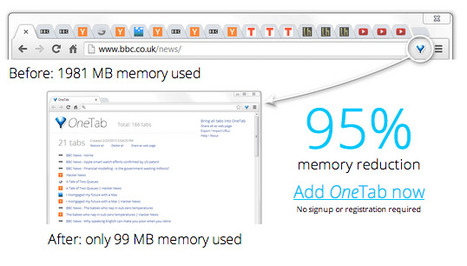
If you are a blogger, news reporter or better yet a content curator, you are certainly familiar with having so many tabs open in your browser, with interesting stuff to check out later, that your computer slows down to a crawl. To avoid this common situation a new free Chrome browser extension comes to the rescue. It is called OneTab and it allows you to instantly memorize and save all of your open tabs into an orderly page in which they are listed, and re-openable at any time. In the OneTab page where your tabs are all saved, you can re-order them in any way you want, group them, export them to other systems or even share them as a public web page. Extremely useful. 9/10 Try it out now: https://chrome.google.com/webstore/detail/onetab/chphlpgkkbolifaimnlloiipkdnihall/reviews?hl=en More info: http://www.one-tab.com/ Help: http://www.one-tab.com/help
Larissa Bonthorne's curator insight,
March 5, 2014 5:09 PM
This Google Chrome tool will allow you to index the tabs you have open and organise them easily.
Gonzalo Moreno's comment,
March 31, 2014 11:51 AM
Sorry, but, is there anything similar for Firefox?<br>:D<br>Thx ahead
Gonzalo Moreno's curator insight,
March 31, 2014 12:01 PM
Para multitaskers compulsivos, como yo, tener 100 pestañas abiertas a la vez es inevitable, con la consecuente ralentización del ordenador.
"News sources can't just give us the facts. They must tell us what those facts mean."
Robin Good's insight:
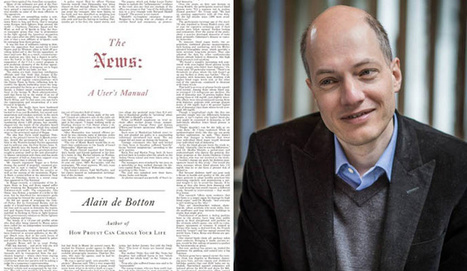
Here's a refreshing look at the future of news that highlights the importance of going deeper into creating value for readers by providing more focus, relevance, context and opinion. The following passages, extracted from the book, The News: A User's Manual, are by Alain de Botton, and have been excerpted from a lengthy article on The Week entitled "The Future of News". "News organizations are coy about admitting that what they present us with each day are minuscule extracts of narratives whose true shape and logic can generally only emerge from a perspective of months or even years — and that it would hence often be wiser to hear the story in chapters rather than snatched sentences. They [news organizations] are institutionally committed to implying that it is inevitably better to have a shaky and partial grasp of a subject this minute than to wait for a more secure and comprehensive understanding somewhere down the line. ... We need news organizations to help our curiosity by signaling how their stories fit into the larger themes on which a sincere capacity for interest depends. To grow interested in any piece of information, we need somewhere to "put" it, which means some way of connecting it to an issue we already know how to care about. A section of the human brain might be pictured as a library in which information is shelved under certain fundamental categories. Most of what we hear about day to day easily signals where in the stacks it should go and gets immediately and unconsciously filed. ... the stranger or the smaller stories become, the harder the shelving process grows. What we colloquially call "feeling bored" is just the mind, acting out of a self-preserving reflex, ejecting information it has despaired of knowing where to place. ...We might need help in transporting such orphaned pieces of information to the stacks that would most appropriately reveal their logic. ...it is news organizations to take on some of this librarian's work. It is for them to give us a sense of the larger headings under which minor incidents belong."
The call for understanding how much greater value can be provided by curating news and information in depth, rather than by following the shallow, buzzy and viral path beaten by HuffPo, Buzzfeed and the rest of the gang, is clear. But beyond context and depth, real value can only be added if we accept the fact that going beyond the classic "objective fact reporting", by adding opinion and bias in a transparent fashion, can actually provide greater value in many ways, as Alain de Botton clearly explains: "Unfortunately for our levels of engagement, there is a prejudice at large within many news organizations that the most prestigious aspect of journalism is the dispassionate and neutral presentation of "facts." ... The problem with facts is that there is nowadays no shortage of sound examples. The issue is not that we need more of them, but that we don't know what to do with the ones we have... ...But what do these things actually mean? How are they related to the central questions of political life? What can they help us to understand? ...The opposite of facts is bias. In serious journalistic quarters, bias has a very bad name. It is synonymous with malevolent agendas, lies, and authoritarian attempts to deny audiences the freedom to make up their own minds. Yet we should perhaps be more generous toward bias. In its pure form, a bias simply indicates a method of evaluating events that is guided by a coherent underlying thesis about human functioning and flourishing. It is a pair of lenses that slide over reality and aim to bring it more clearly into focus. Bias strives to explain what events mean and introduces a scale of values by which to judge ideas and events. It seems excessive to try to escape from bias per se; the task is rather to find ways to alight on its more reliable and fruitful examples. There are countless worthy lenses to slide between ourselves and the world." Overall, these ideas offer a truly refreshing look at the future of news and at the relevance that context and opinion could play in transforming this medium from a vehicle of mass distraction to one of focused learning and understanding for those interested. Must read. Rightful. Insightful. 9/10 Full article: http://theweek.com/article/index/256737/the-future-of-news Reading time: 10':20"
Javier Antonio Bellina's curator insight,
February 25, 2014 2:36 PM
El futuro de las Noticias no es sobre los Hechos, sino sobre contexto, relevancia y opinión.
Robin Good's insight:
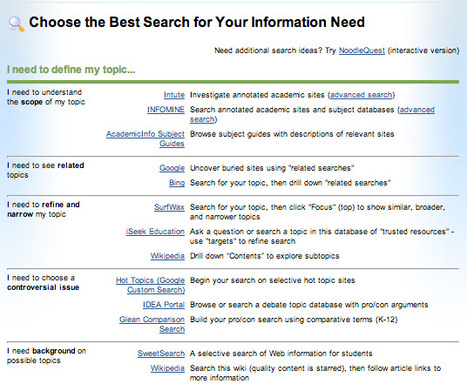
A curated selection of the best search engines organized according to what you need to find. Useful. Great example of how to create a useful, curated information resource. Free to use. Full resource: http://www.noodletools.com/debbie/literacies/information/5locate/adviceengine.html
Steve Whitmore's curator insight,
June 17, 2014 7:59 AM
Good reference list. I didn't realize there were so many search engines.
ManufacturingStories's curator insight,
August 14, 2014 5:22 PM
For more resources on Social Media & Content Curation visit http://bit.ly/1640Tbl
Robin Good's insight:
NewsDeck is a news curation app that allows to organize and share breaking news and resources with specific teams and departments within an organization. Any web page article or resources can be easily collected with a bookmarklet and assigned to a specific group or project. Collections of saved news appear inside Pinterest-like visual boards. Users can join the groups they are most interested into without needing to be bombarded with useless info that it's not relevant to them. News and resources can also be added directly via email. Free to use. More info: http://www.newsdeck.com/
Robin Good's insight:
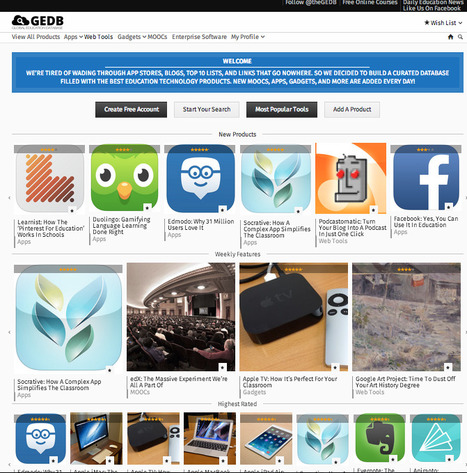
GEDB, the Global Education Database, is a great and extremely useful curated collection of the best apps, web tools, gadgets and moocs now available online for educational purposes. Anyone can register to GEDB and submit any valuable resource or tool by filling out the dedicated form. Submissions are reviewed for factual accuracy and integrity and approved and published within 24 hours. Readers and contributors can in turn rate the review and share it online. This is a great educational resource, simple to consult and well organized. A treasure trove of qualified resources for anyone wanting to teach and learn with new technologies. Free to use. Try it out now: http://www.gedb.org/
Jeroen Boon's curator insight,
February 21, 2014 8:06 AM
De Global Education Database (GEDB), is een zeer groot en nuttige verzameling van de beste apps, web tools, gadgets en moocs nu online beschikbaar voor allerlei educatieve doeleinden. Iedereen kan zich registreren bij GEDB en waardevol hulpmiddelen of instrumenten delen door het invullen van een speciaal formulier. Inzendingen worden beoordeeld op feitelijke onjuistheden en integriteit en wanneer goedgekeurd gepubliceerd binnen 24 uur. Probeer het nu: http://www.gedb.org/
Diana Andone's curator insight,
February 25, 2014 12:59 AM
GEDB, the Global Education Database, is a great and extremely useful curated collection of the best apps, web tools, gadgets and moocs now available online for educational purposes.
Robin Good's insight:
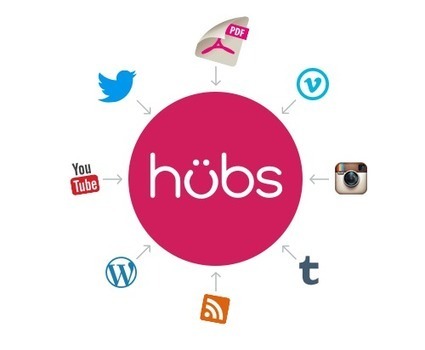
Uberflip is a new web publishing tool that allows a company to easily create a social hub populated with the most relevant content coming from their main media properties, including blogs, RSS feeds, social media channels, images and videos, presentations and PDF documents. Uberflip publishing metaphor is the "hub" in which, similarly to Rebelmouse and Pressly you can create multiple channels where you either aggregate or curate theme-specific content. Among Uberflip unique features there is the ability to import and convert PDF documents into editable flipbooks, an array of widgets that can be added to integrate more functionalities (e.g.: Disqus comments) and a call-to-action feature allowing you to integrate customizable and elegant subscription boxes that directly connect to your newsletter provider (e.g.: Malchimp). Check my test site to get an idea of what you can do with it: http://robingood.uberflip.com/h/ My comment: Compared to Rebelmouse, Pressly, Uberflip is a tough contender. Its key strengths are the elegant and clean output design, which displays excellently also on tablets and smartphones and the breadth of features for curating and collecting content (e.g.: custom collections). Uberflip is also the only tool of this kind that integrates a PDF to flipbook conversion engine, allowing you to integrate any company PDF into one or more collections in a beautiful format to view. The Basic version, which allows for one hub with multiple channels, one custom collection and one CTA costs $49.95/month. Higher priced versions at 199 and 499/mo allow for using your custom domain, more collections, CTAs and additional features including analytics and other features. Pricing info: http://www.uberflip.com/pricing Free 14-day trial. Ty it out now: http://www.uberflip.com/ My test site: http://robigood.uberflip.com -> Added to Social Media Aggregators & Hubs in the Content Curation Tools Supermap
Robin Good's insight:
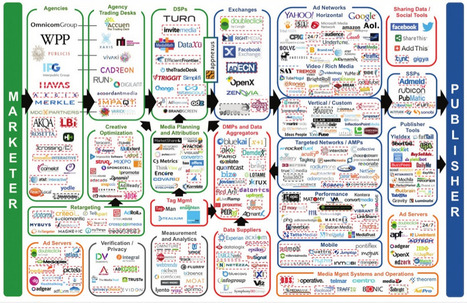
LumaPartners, an investment bank that provides strategic advice to digital media companies, has created over time a wonderful and quite useful collection of industry landscapes that cover specific sectors such as Search, Video, Mobile and Marketing Technologies. Each map aggregates, organizes and groups the most relevant players in a specific industry sector at a certain point in time. An excellent example of how curating and organizing a large number of resources in a specific field can provide a useful reference sought and appreciated by many. Free to access. All collections: http://www.lumapartners.com/resource-center/lumascapes-2/ Specific maps worth checking out:
.
Nicoletta Gay's curator insight,
February 6, 2014 5:56 AM
A visual collection of the increasingly overlapping key sectors of digital media: DISPLAY, SEARCH, VIDEO, MOBILE, SOCIAL, COMMERCE, and GAMING.
Robin Good's insight:
AcademicTorrents is a new web service which allows any organization owning large datasets (no size limits) to easily distribute them without needing a dedicated infrastructure. The brainchild of Joseph Cohen and Henry Lo, two PhD students working at the University of Massachusetts in Boston, Academic Torrents facilitates the job of researchers, journalists and information analysts in finding, accessing, curating and downloading large-size datasets. Technically-speaking AcademicTorrents is a bittorrent-type redundant high-speed network and a full distributed system for sharing enormous datasets. As a P2P system it doesn't require intermediate servers, is also fully scalable, secure, fault-tolerant and can act as a reliable repository for data allowing fast downloads. Users can also search the full index, and can create curated datasets collections containing any kind of files and which can be downloaded as a full bundle. This type of system could prove to be an excellent resource for libraries storing digital papers as they would store books, and for simplifying the distribution requirements of any organization needing to publish, curate and share large datasets. "A robust distributed replication design allows libraries to utilize this system as their backbone. Providing fault tolerant hosting of curated data for a university, research lab, or home library. Find out more: http://academictorrents.com/ More info: http://academictorrents.com/about.php Browse Datasets: http://academictorrents.com/browse.php?cat=6 Browse Papers: http://academictorrents.com/browse.php?cat=5 Browse Collections: http://academictorrents.com/collections.php . .
Ivan Landuyt's curator insight,
February 4, 2014 4:02 AM
Zeker verder te onderzoeken in de context van het aspect "bibliotheek" als het aspect "data resources".
Susie Macfarlane's curator insight,
February 4, 2014 6:31 PM
"AcademicTorrents is a new web service which allows any organization owning large datasets (no size limits) to easily distribute them without needing a dedicated infrastructure." Robin Good |
From
pluto
Watch the best videos for free, 24/7, on any device. From music to sports, kids, skate, surf, comedy and more—it's out of this world.
Robin Good's insight:
Pluto.tv is a new web service which curates the best video clips available online by organizing content coming from YouTube and many other video sharing sites into thematic programs of 30 minutes each. The interface is very similar to the one utilized by program guide viewers on standard cable TV. Pluto.tv offers already more than 100 thematic video channels all curated by human beings. My comment: An effective approach to surface great video content while delivering it in a familiar and consumable format. Available also as an app for iOS and Android. Free to use. Try it out now: http://pluto.tv
Christian Faisy's curator insight,
April 22, 2014 1:08 AM
Chaine web magique, vous sélectionnez simplement le type de contenu que vous souhaitez voir puis vous regardez en direct le meilleur des contenus TV disponibles, sous forme d'une grille de programmes
Josette Williams's curator insight,
May 3, 2014 3:31 PM
Video curation tool from any device 24/7. Thanks Robin Good for sharing this post.
Robin Good's insight:
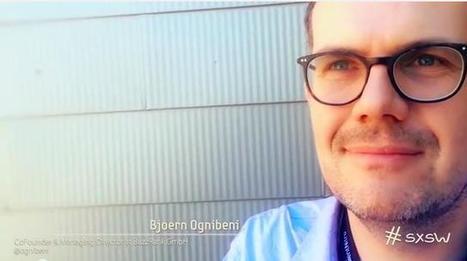
Lutz Finger, reports from SxSW on the topic of algorithms, curation and the future, as the skills of content creators, data analysts and code programmers are seemingly converging for the first time. Among others, he reports Steve Rosenbaum (founder of Magnify.net) significant own words at SxSW: "...a wise combination of human judgement enabled by algorithms will become the new king of content." But while there are great new tools, startups and ideas leveraging the great potential of big data and human curation, there is a big, invisible danger, still looming on us. "The danger is that any algorithm might fall prey to someone trying to influence it. But the biggest and realest danger lies in us. Informative. Resourceful. 7/10 Full article: http://www.linkedin.com/today/post/article/20140320132545-6074593-the-age-of-the-algorithms-sxsw-summary See also: www.masternewmedia.org/future-of-search Image: Bjoern Ognibeni - SxSW
Georges Millet's curator insight,
March 25, 2014 4:10 AM
Knowledge & life turning today into a (google) search. Algorithms are key!
Stephen Dale's curator insight,
March 26, 2014 4:35 AM
"We are in the era of the algorithm. They decide what news we will see, they decide which person is important and they will even merge more and more into our non-digital lives.
But the biggest and realest danger lies in us. If we believe that there is only one truth and that is the one generated by a black-box algorithm we might be deceived easily."
A reminder, then, that algorithm's should not take the place of critical thinking.
Robin Good's insight:
Here's a short first-hand report highlighting how an 8th grade social studies class teacher (Terri Inloes) has fully leveraged the content curation potential to let her students dive, discover and make sense of topics (in this case social reform movements) that they had not studied before. All by themselves. Here the steps taken to make this happen: a) By using the Question Formulation Technique, the teacher prepared pairs of photographs representing each of the reform movements, one picture dating back to the late 19th century, and another representing where that social reform movement stands in today’s society. b) After checking out all of the photos, students settled on the pair of pictures that most caught their interest. c) They brainstormed and refined a set of specific questions, and then shared their thinking with the class. e) At this point students planned their research strategies. By using 5 different graphic organizers from the book Q Tasks, by Carol Koechlin and Sandi Zwaan, students were allowed to choose the one that they thought would help them the most in planning their keyword search strategies. f) Students were assigned WordPress blogs and provided basic instructions on how to use them to curate and publish their research work. g) Discovery and real learning kicked in as students proceeded in collaborative groups to research and document their chosen topic. You can see some of the outcomes that this assignment produced right here: General Conclusions http://tmsredvotingrights.d20blogs.org/2014/02/24/conclusion-3/ Voting Rights Inequality http://tmsredvotingrights.d20blogs.org/ Mental Health Treatment Prohibition Acts http://tmsorangeprohibitionacts.d20blogs.org/
A very inspiring example of content curation can be effectively applied in the classroom with impressive results. Highly recommended. 9/10 Thanks to Nancy White of Innovations in Education for participating, writing and reporting about it. Original post: http://www.techlearning.com/Default.aspx?tabid=67&entryid=7296
Trish Sadar's comment,
March 20, 2014 5:03 PM
Robin...you are an example and master to all of us. We all aspire to be more like you!!!
Maria Persson's curator insight,
March 21, 2014 12:11 AM
If you are considering being a teacher for this and the next generation - take a few tips from this scoop!
Audrey's curator insight,
March 21, 2014 7:30 PM
Curating is about finding and selecting information in order to learn about a subject. Youngsters can be encouraged to do this pre-school. This motivational 21st century skill can be encouraged at home. with educational games toys and and books which stimulates interest. For example children can learn about science by interacting with Chemistry Lab; Horrible Science - explosive experiments; Newton's Cradle and Science Museum. By the time they get to school they are already full of curiosity and ready to increase their knowledge. Audrey curating for www.homeschoolsource.co.uk
Robin Good's insight:
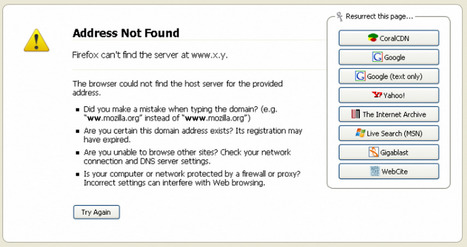
Resurrect Pages is a free Firefox Add-on that allows you to instantly find archived and cached copies for any dead page or broken URL. Specifically, Resurrect searches through these cache/mirrors:
Free to use. Try it out now: https://addons.mozilla.org/en-US/firefox/addon/resurrect-pages/
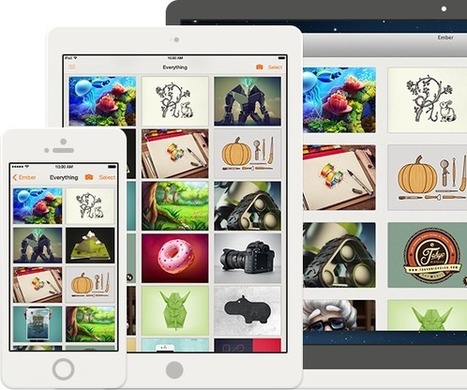
Collect the things you love, with Ember. Whether you’re capturing photos, screenshots or any other kind of image - save, annotate and sync it with Ember.
Robin Good's insight:
Ember is a Mac and iOS app that allows you to easily capture parts of a screen, a specific image, a whole window or a full web page easily and to edit it, collect it and organize it according to tags, themes/groups and colours. Ember key strengths are: a) the image "capture" toolset, which is second to none. It offers maximum flexibility, it is simple, and allows you to save directly to any folder/group/collection you have set-up. b) the image editor utility that integrates a set of useful tools that includes cropper, focus/blur areas, rotate, add text, freehand drawing. c) the elegantly designed "library" where you can organize your images and screenshots easily via drag and drop into collections. Each image can also have a description and multiple tags. In addition Ember can automatically sort all your images by colors. d) the "subscription" area where you subscribe to image feeds from various sites and galleries to get inspiration and ideas. iCloud-syncable. Ember is a beautifully designed app that does a fantastic job of capturing any kind of image or screenshot from the web and to give you relevant tools to edit it and "curate" it into private collections. Free to 14-day trial. N.B.: Ember requires Mac OSX Mavericks to run. More info: http://realmacsoftware.com/ember Free trial: http://realmacsoftware.com/redirects/ember/try/ Download from Mac App Store: http://realmacsoftware.com/redirects/ember/appstore Download from iOS App Store: http://realmacsoftware.com/redirects/ember-ios/appstore Check these two use cases:
Robin Good's insight:
Crystal Renfro, a subject and Faculty Engagement Librarian at Georgia Institute of Technology in Atlanta, Georgia, introduces the relevance of content curation to academic librarians beyond the notions generally prescribed by Digital and Data Curation specialists. A good introduction to a new way of looking at curation for digital archive specialists and academic information librarians. Rightful. Informative. Good introduction. 7/10 Full article: http://www.academicpkm.org/2014/03/03/content-curation-beyond-institutional-repository-library-archives/ Reading time: 4'
Crystal Renfro's curator insight,
March 4, 2014 7:08 AM
I really appreciate Robin Good's comments on my article from Academicpkm.org. He says:
"Robin Good's insight:
Crystal Renfro, a subject and Faculty Engagement Librarian at Georgia Institute of Technology in Atlanta, Georgia, introduces the relevance of content curation to academic librarians beyond the notions generally prescribed by Digital and Data Curation specialists.
A good introduction to a new way of looking at curation for digital archive specialists and academic information librarians.
Rightful. Informative. Good introduction. 7/10"
Robin Good's insight:
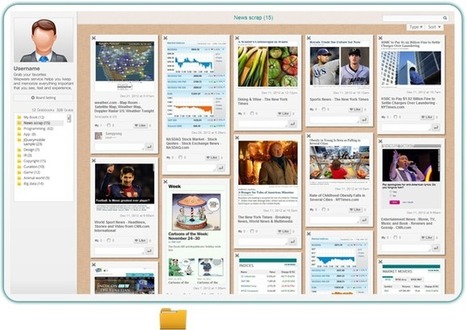
Wepware is a new web app which allows you to capture any web page or portion of it and organize it into Pinterest-like boards which can be easily published and shared on social media channels. Unique strengths include the ability to capture dynamic information boxes (flight schedule, sport scores, etc.) that will continue to be updated even when they are inside your curated collections. In addition, such live dynamic info snippets can be easily pasted on any web page you want and kept there as a live reference. My comment: Powerful dynamic capture feature allows the creation of unique dynamic dashboards that collect and organize information from various sources in real-time. Available as a Chrome browser extension. Free to use. Try it out now: http://www.wepware.com/ More info: http://www.wepware.com/web/landing
wanderingsalsero's curator insight,
February 25, 2014 5:09 AM
I can see where this could be very useful to a business owner wanting to aggregate content for his/her customers.
Robin Good's insight:
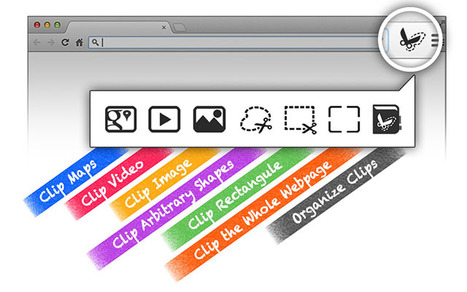
Scissorsfly is a great new web app which allows you to "photograph" any screen or part of it and to collect and organize these pictures into Pinterest-like boards. The capture functionality allows you to not just to pick images available on a web page as you would do with Pinterest but it allows you to clip any part of a web page or a full visible screen as you may see fit. Differently than on Pinterest, the collected items can be easily arranged, positioned and resized on the board. Scissorsfly provides a Chrome browser extension (Firefox and Safari coming soon) that once clicked provides a small toolbar with all of the key commands available. Free to use. Excellent capture and collect tool, provides lots of the original functionalities available in the now defunct Clipboard.com. Unfortunately there is no ability to capture a full web page, from top to bottom, but outside of this, I really found Scissorsfly to be an excellent tool for capturing and curating ay type of content available online. Try it out now: https://www.scissorsfly.com/ Chrome app store: https://chrome.google.com/webstore/detail/scissorsfly/hjhmkhdbecgcmhohojlcjddicnbgahcp/details
Alfredo Corell's curator insight,
August 15, 2014 2:25 PM
About ScissorsflyIn the spirit of freedom and creativity, we designed Scissorsfly. For the first time ever, you will be equipped with something that frees your imagination to creatively collect and organize everything you love on the web, and share them with friends. Scissorsfly originates from an open hackathon hosted at LinkedIn, when Sillicon Valley tech talents from places like Google, Twitter, LinkedIn, or CMU, MIT, Stanford, Berkerly came to play. We won the championship with the idea called ClipIt, which becomes the magic scissors at your hand today. Web 1.0 gave you static webpages. Web 2.0 gives you interactions and collaborations with the web and the world. Scissorsfly will give you not only that, but also the initiative to tailor the web at will. It will be an experience beyond the long lasting web 2.0... Finally, you can run wild with these scissors. Their MissionCollecting and organizing information is really important to us. However, it could be painful from time to time. We built Scissorsfly for you to enjoy the process. TeamWe are an early stage startup based in Mountain View (CA) and Chicago (IL). Our team is small and close-knit, with both strong engineering (e.g. Google, Yahoo!, Linkedin, eBay) and research (e.g. security, data mining, machine learning) backgrounds. For anything interesting, drop us a line at support@scissorsfly.com.
Robin Good's insight:
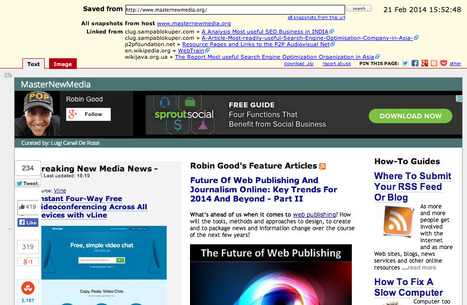
Archive.is is a free web service which allows you to capture, store and archive permanently any web page you submit. Archive.is permanently stores a double copy of your selected web site: one that is an image snapshot of the page, and another which contains the full text of it. Archive.is also provides a download link that contains a zipped copy of all the files making up your selected page, and which can be opened offline in any web browser. Archive.is can save most any type of web page including Facebook pages and it allows you to easily search and see all of the pages already saved for a certain domain. There is no registration or login required and you don't need to install anything. A free dedicated bookmarklet makes it easy to capture and archive any web page you happen to be on. If you are looking for a free, simple and easy to use service to archive any web page permanently, I recommend Archive.is.
Try it out now: http://archive.is/ Useful info on blog page: http://blog.archive.is/ Added to Permanent Web Page Archiving Tools section of the Content Curation Tools Directory
jspellos's curator insight,
February 22, 2014 10:25 AM
Great tool to quickly save web pages, including social media pages with hashtags. Don't forget to grab the bookmarklet and move it onto your browser, too!
Alison Hewett's curator insight,
February 28, 2014 4:01 PM
This could be handy to use with students looking at how internet based media can change and a story be altered. use this tool to preserve current ate of a story at a particular day/time.
Josette Williams's curator insight,
June 23, 2014 1:42 AM
I love the idea of this site-Archive Is-archive any site permanently and access it later. Thanks Robin Good.
Robin Good's insight:
From the paper abstract: "Social media such as microblogs have become so pervasive such that it is now possible to use them as sensors for real-world events and memes. While much recent research has focused on developing automatic methods for filtering and summarizing these data streams, we explore a different trend called social curation. In contrast to automatic methods, social curation is characterized as a human-in-the-loop and sometimes crowd-sourced mechanism for exploiting social media as sensors." The paper attempts to analyze curated microblog data and to understand the main reasons why people "participate in this laborious curation process". It also looks at "new ways in which information retrieval and machine learning technologies can be used to assist curators" and it also suggests "a novel method based on a learning-to-rank framework that increases the curator's productivity and breadth of perspective by suggests which novel microblogs should be added to the curated content." The paper contains valuable information for anyone interested in having more statistical data about social curation activities and patterns on Twitter, the use of lists and the typical reasons why individuals want to do this. Interesting. 7/10 Full original PDF paper: http://cl.naist.jp/~kevinduh/papers/duh12curation-long.pdf
Robin Good's insight:
Pressly is a new web app which allows you to create a social hub, similar to what you can do with RebelMouse or Tint, where you can aggregate and curate your favorite content from your social media channels, web site as well as from your fans content. The app can aggregate and curate content coming from Facebook, Twitter, LinkedIN, Instagram, Pinterest, YouTube, SoundCloud, Vimeo and from any RSS feed. Similarly to its growing number of competitors Pressly automatically generates a social hub that can be easily viewed across web, tablets and smartphones and that it's very easy to navigate. Differently than RebelMouse, the content aggregated is not just excerpted or simply pointed to, but it is actually imported, stripped of anything outside the original text and images and presented in a new clean and highly readable format. My comment: A solid content aggregation and curation tool and a valid alternative to RebelMouse. Great UI, ease of use and ability to search and find relevant content. Here there are some tangible margins of improvement in making the curator less constrained when searching and browsing results for new content. Pressly offers a free version with the possibility of using your own domain name, Google Analytics integration and up to 10,000/month views. The PRO version, adds support for capturing email leads, the options of using standard ads, up to 100,000 views and analytics at $499/mo. Pricing info: http://www.pressly.com/pricing Try it out now: http://www.pressly.com/ Examples: http://resources.pressly.com/content http://robingood.pressly.com/ (test page) http://robingood.pressly.com/feature-articles (test page) Similar tools: RebelMouse, Tint, Postano, Overblog, Streamhub, Stackla, Uberflip. See: Social Hub Publishing Tools
Voting4all.nl's curator insight,
February 13, 2014 3:21 AM
promote je school of laat de leerlingen en schoolkrant maken.
Excerpt from article by Mashable:
Both use a tiled layout that displays news in a grid. But while Flipboard's design puts content first, Paper puts Facebook first, emphasizing interacting with your Facebook friends and timeline whenever possible.
When it comes to finding and reading news, the two apps take very different approaches. Simply put, Flipboard is an aggregator while Paper is a curator.
Sharing and social media integration is at the heart of any news discovery app. Unsurprisingly, social media integration with Flipboard is much more subtle, while Paper puts Facebook front and center.
Flipboard is great for collecting all the news you want to read from the sources you like. And if you rely on Flipboard as an aggregator, Paper won't be a replacement. Paper is more of a Facebook app than a "news" app, and it's best suited for those looking to share and discover content with friends. Via Giuseppe Mauriello
Debbie Elicksen 's curator insight,
February 7, 2014 6:56 PM
Facebook seems to be testing the waters. Imagine if Paper is really popular, the company will add features.
|
Your new post is loading...
#VeryShortList