Your new post is loading...
Robin Good's insight:
Collectably is a content curation web app which allows you to bookmark any web site and to organize it into visual collections. A unique Chrome extension makes Collectably particularly useful as it pioneers the ability to save all of your open tabs into a visual collection that you can immediately prune, organize visually and sub-divide into specific groups. This feature by itself is worth gold for any serious researcher or content curator as it allows to easily move from seeing just trees into seeing the whole forest and into organizing into logical groups for further work. Priceless. If you frequently search and explore new information and tools online, I highly recommend it. It's that good. Free to use. Try it out now: http://collectably.com/ Chrome extension and Bookmarklet: http://collectably.com/#/tools N.B.: You have by default a similar functionality available inside Firefox. It is called Group Tabs and you can activate it by goign to the View menu -> Toolbars -> Customize and by dragging the mosaic looking Tab Group icon into your browser top bar. Try it. It's excellent. The only difference with Collectably is that Group Tabs are private to you and not shareable on the web.
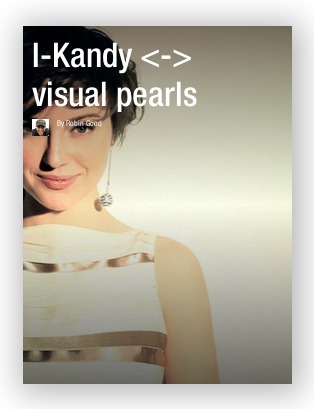
"I-Kandi by Robin Good | A curated web-magazine of most elegant and inspiring cinemagraphs."
Robin Good's insight:
I am convinced that the Flipboard paginated format and its high attention to visual design is an anticipation of things to come. Just like Pinterest showed the way for an infinite number of look-alikes in more specific niches and applications, so I think that Flipboard has anticipated squarely a key emerging trend for digital publishing: highy visual design layouts that fit perfectly your screen size real-estate. This is why I have invested some time over the last few weeks to explore the Flipboard platform for content curation, a little more than I had done before. In the effort to leverage Flipboard outstanding visual layout abilities I opted for creating, amog others, a flip mag that would incorporate only images. A collection of the most elegant and inspiring "cinemagraphs" that I can find on the Internet. Cinemagraphs are unique images that are partly photographs and partly video. Even though, Flipboard does not yet offer any tool to control precisely where each image will appear in the publication, or what kind of layout each page will have, the results that I have been able to achieve make me optimistic about what it will be possible to do once Flipboard opens up a full web-based editor to control many of these visual aspects. Here it is: http://flip.it/7mBGA P.S.: Let me know what you think, and if you like it, please share it and subscribe to it. It's free. N.B:: To obtain the best visual effect, I have sourced the images from their original URLs, most times outside of the article in which they appeared. So while there remains a link to all source images, it may not be readily apparent from what site, author or magazine this cinemagraph have been sourced. Being all of these images nothing short of small artworks I am looking for the best way to credit the original authors and publishers without having to add time consuming procedures. For more info on Flipboard check: http://sco.lt/8INYMz
LibraryThing catalogs your books online, easily, quickly and for free.
Robin Good's insight:
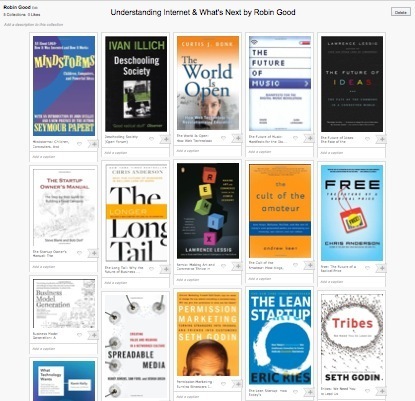
LibraryThing is a full-powered online book cataloging application, capable of searching the Library of Congress, five national Amazon sites (Italy missing), and more than 690 world libraries. Available since 2006, it offers anyone the opportunity to create a personal profile and then to search, find and add any book ever catalogued or published into your collections. You can review, tag, rate, organize, sort, filter, group any book you find and you can also specify the perfect match cover (among the many published) that you want to use as reference. From the official site: "LibraryThing knows a lot about books and how books connect, providing some of the best recommendations on the web. LibraryThing gives you library-quality data for your books, and is also full of social information. Each book page shows you which members have the book and what they think about it — tags, reviews and even links to conversations about the book." A free account allows you to catalog up to 200 books. A paid account allows you to catalog any number of books. Paid personal accounts cost $10 for a year or $25 for a lifetime. My comment: Stunning. I don't know why it took me so long to discover it, but this is an amazing resource for book lovers of all kinds wanting to curate and share their own favorite books. While the interface shows quite a bit of age in many aspects, the array of functions and useful options available to the user is simply amazing. Try it out now: http://www.librarything.com/ Tour: http://www.librarything.com/tour/ What makes it special: http://www.librarything.com/blogs/librarything/2013/04/what-makes-librarything-librarything/ Quickstart Guide: http://www.librarything.com/quickstart.php FAQ: http://www.librarything.com/wiki/index.php/Your_library_and_your_books *Added to section Books Curation inside Curation Tools Supermap
Janet Tillotson's curator insight,
February 3, 2014 12:48 AM
This is a wonderful social networking site for book lovers!
Shauna's curator insight,
May 16, 2014 9:34 AM
I wonder if libraries will start to favour a visual layout like this at some point to showcase their collections.
Jean Maiorella's curator insight,
August 8, 2014 11:25 AM
Love this! The automatic + member recommendations based on my book list is great when I'm floundering in my search for something new to read.
Robin Good's insight:
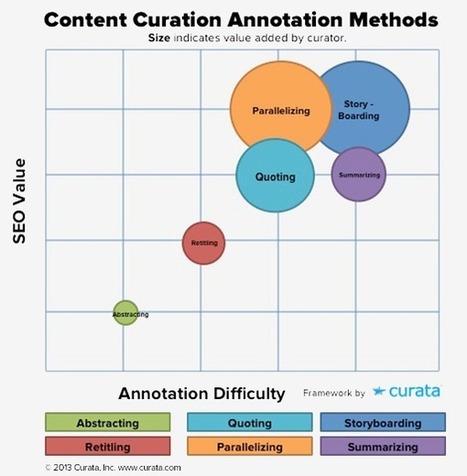
Pawan Deshpande, founder and CEO of Curata, has just published an article that provides some very useful guidelines to content marketers interested in improving their basic content curation skills. The article provides six alternative approaches to curating content, from simple ones like quoting and retitling, to more advanced ones like parallelizing, storyboarding and summarizing. The context provided in this article circles around three key factors:
so that you can compare, among the alternative curation approaches presented, the ones that better match your own needs. But, beware. Though content marketing experts have you believe that saving time, seo impact and traffic size are key variables to go after, I remain of the impression that true "added value" provides order of magnitude greater benefits than the other two combined. In other words, to rank and evaluate the value of a curation approach versus another, I would ask: Does the curation produced help other people make better sense of a topic? Does it allow for others to learn about an issue without having to juggle and research tens of dubious resources? Does it save the reader time in learning about the topic he's interested in while providing him with all the needed info? Having said this, I deem this article particularly useful for content marketers getting interested in content curation, and in learning which approaches they can adopt, besides reposting and sharing the best content they can find, to improve their "value added" propositions. Useful. Resourceful. 7/10 Full article: http://www.curata.com/blog/6-content-curation-templates-for-content-annotation/ (Thanks to Marjolein Hoekstra for pointing me to this article)
ManufacturingStories's curator insight,
August 14, 2013 8:16 AM
These are some great ideas. Content curation is a great teaching tool for students. Thanks Robin for your great and dedicated CURATION!
Roberto Ivan Ramirez's comment,
August 15, 2013 8:51 PM
El arte de curar información en la Web es más que una práctica del conectivismo, es parte de un ejercicio de aprendizaje e inteligencia colectiva.
"The Motley Fool - As choice becomes overwhelming, the winners of the future retail war will be the ones who can help guide customers to the perfect products."
Robin Good's insight:
Motley's Fool contributor Andrew Marder has written about the critical importance that curation will have for the retail universe by citing as relevant examples Netflix and Amazon. Netflix for example officially states: "...instead of trying to have everything, we should strive to have the best in each category." In short, curation looks to provide customers with the best possible products instead of the most products possible. "Amazon has dabbled in curation through its lists system, which allows other users to make curated lists, and through its "customers who viewed this item also viewed..." capability. ... The success of curation is going to come from the combination of massive selection and systematized suggestion. The model that Amazon is skirting the edges of gives consumers the ability to both drive their own choices and discover new ways to spend their money. As the algorithms that choose these recommendations become more powerful, the businesses will find higher strike rates with the suggestions. My comment: Undoubtedly, a growing trend emerging for online retailers is the need to focus on selecting and curating the most relevant products, rather than all of those available, for their specific tribe. This is why those retailers capable of finding and hiring quality curators (or leveraging their users passions) to organize and showcase their product line-ups will be enjoying greater conversions and sales than those simply using algo-based selections. Rightful. Insightful. 8/10 Full article: http://www.fool.com/investing/general/2013/05/23/the-future-of-retail-is-curation.aspx (Image credit: Pair of shoes circle by Shutterstock)
Prof. Hankell's curator insight,
August 11, 2013 7:27 PM
Robin Good's insight:
Motley's Fool contributor Andrew Marder has written about the critical importance that curation will have for the retail universe by citing as relevant examples Netflix and Amazon.
Netflix for example officially states: "...instead of trying to have everything, we should strive to have the best in each category."
In short, curation looks to provide customers with the best possible products instead of the most products possible.
"Amazon has dabbled in curation through itslists system, which allows other users to make curated lists, and through its "customers who viewed this item also viewed..." capability.
...
The success of curation is going to come from the combination of massive selection and systematized suggestion. The model that Amazon is skirting the edges of gives consumers the ability to both drive their own choices and discover new ways to spend their money. As the algorithms that choose these recommendations become more powerful, the businesses will find higher strike rates with the suggestions.
My comment: Undoubtedly, a growing trend emerging for online retailers is the need to focus on selecting and curating the most relevant products, rather than all of those available, for their specific tribe. This is why those retailers capable of finding and hiring quality curators (or leveraging their users passions) to organize and showcase their product line-ups will be enjoying greater conversions and sales than those simply using algo-based selections.
Rightful. Insightful. 8/10
Full article:http://www.fool.com/investing/general/2013/05/23/the-future-of-retail-is-curation.aspx
Robin Good's insight:
Mitch Free writes on Forbes about the unique business value that curation can bring to those markets where there is already an abundance of choices. "The web has revolutionized access to information. If you travel to a new city, you don’t have to wait to ask a hotel concierge or local contact which restaurants are worth your time: that information is at your fingertips long before you arrive. The web’s universality and ubiquity are also its weaknesses, however: even if all are listed online, choosing from the 25,000 restaurants in New York City still requires a local’s advice. While “curation” might bring to mind the image of a red-jacketed museum staffer scowling at you for taking flash photographs, in the digital age it’s becoming an increasingly critical – and lucrative – business model. No longer is access to information precious in itself. Information is overwhelmingly available, and those in a position to tame the tidal wave into a useful format offer a valuable service." The articles uses as a reference example the case of a new restaurant listing site that curates the best 100 restaurants in 100 cities by charging qualifying restaurants. Rightful. Interesting. 7/10 Full article: http://www.forbes.com/sites/mitchfree/2013/08/05/curation-by-connection-one-hundred-tables/ (Image credit: Music cafe menu card by Shutterstock)
Alejandro Tortolini's curator insight,
August 6, 2013 4:21 PM
La curaduría de contenidos como modelo de negocios, por Robin Good.
Prof. Hankell's curator insight,
August 7, 2013 10:19 AM
Robin Good's insight:
Mitch Free writes on Forbes about the unique business value that curation can bring to those markets where there is already an abundance of choices.
"The web has revolutionized access to information. If you travel to a new city, you don’t have to wait to ask a hotel concierge or local contact which restaurants are worth your time: that information is at your fingertips long before you arrive. The web’s universality and ubiquity are also its weaknesses, however: even if all are listed online, choosing from the 25,000 restaurants in New York City still requires a local’s advice. While “curation” might bring to mind the image of a red-jacketed museum staffer scowling at you for taking flash photographs, in the digital age it’s becoming an increasingly critical – and lucrative – business model. No longer is access to information precious in itself. Information is overwhelmingly available, and those in a position to tame the tidal wave into a useful format offer a valuable service."
The articles uses as a reference example the case of a new restaurant listing site that curates the best 100 restaurants in 100 cities by charging qualifying restaurants.
Rightful. Interesting. 7/10
Full article:http://www.forbes.com/sites/mitchfree/2013/08/05/curation-by-connection-one-hundred-tables/
Ken Dickens's curator insight,
August 7, 2013 1:00 PM
Non-Profits are a commodity. There are over 1.5 million of them in the US alone, all with great causes, all with their hands out to ask for money. Enter Donor Fatigue. Want to stand out? Become "the" source of information on your cause. In other words, give to get. You will stand out. You will gain trust. And, you will raise money.
Robin Good's insight:
A dedicated bookmarklet is also available which makes it a breeze to also add products that do not sport yet the "+ Add to Collection" button. Collected items and collections can be easily shared on Facebook and Twitter or via email. Like on Pinterest, Amazon Collections allows you to comment any of the items you post, to follow other "collectors" (not individual boards), to like items and to repost any them into another collection. You can decide whether a collection is public or private and you can also easily rename or delete any collection created. My comments: Excellent and long due upgraded version of the Wish List (which remains available and also allows creation of product lists) No ability to embed collections elsewehere. No ability to re-arrange items in a collection. Fresh out of the gate, this feature may provide lots of economic benefits and insight to Amazon and a more effective way for users to find relevant and related products via their trusted curators and guides. Key differences with Wish Lists: Visual layout and social features are the key differentiators. The display of Collections is very much like a Pinterest like collection while a Wish List offers a vertical linear list mode or a text-only compact alterative. In addition, Amazon Collections allow for the collector to provide a comment / description to any product listed, to like and report other collectors' items, and to easily share these on FB and Twitter. Free to use. See what others are collecting here: http://www.amazon.com/gp/river Find out more: http://www.amazon.com/gp/ssx/learn_more_popup?selected_tab=learn-more-1&navigated_from=Recollect+Own+Dialog# A set of sample collections I have created: *I've added Amazon Collections to the section "Product Curation Tools" inside the Content Curation Tools Supermap.
Robin Good's comment,
August 8, 2013 7:30 AM
Scoop.it ha cambiato oggi il colore dei link. Penso dipenda da quello.
Now you can enjoy Flipboard magazines on the Web. Here's a quick tutorial about their basic features. To start browsing Web magazines, go to: https://flipboa...
Robin Good's insight:
Use is extremely simple and straightforward. After you have created a new magazine on the topic of your choice, you can easily a) search through Flipboard curated content and "reflip" relevant items to your magazine, or b) use a dedicated button / bookmarklet to add "on-the-fly" web articles or videos to one or more of your mags. The trade-in for all of this simplicity is very little opportunity for editing and personalization. You can't edit the title, add your image, or format your introductory comments, nor you can decide anything about how your curated content will be laid out and presented. It is possible to invite other users to collaborate and contribute to your own magazines and it's easy to share what you post in Flipboard also on your preferred social media (Facebook, Twitter). Flipboard does an excellent job of curating the hundreds of thousands of visual magazines being created by picking, organizing and surfacing the best and most interesting ones. This approach provides a very effective solution to filtering out shallow, superficial and spammy content, in favor of truly memorable visual collections of pointers to great content. My comment: Content curation on Flipboard is a 4-step process that even non-technical people can understand quite easily. Flipboard it's as easy and simple to use as Pinterest. You find an interesting an article on a topic you cover? You tap the "+" button (on your smartphone) or click the "Flip it" button (desktop), you select an image, add a comment, pick in which magazine of yours to place it and you're done. Flipboard is a powerful tool because it makes it extremely easy to pick content and repackage it into a stunningly beautiful visual magazine that can be read and edited across any type of device. The skills and ability of the Flipboard internal curation team makes all of the difference in making Flipboard a unique "open" source of high-quality curated content, organized by topics, presented in a stunning visual format. In this respect Flipboard is a significant step ahead of its direct competitors. That is, if you are looking for a quality source of content curated by users, Flipboard has something of value to provide. Excellent solution for anyone who has an interest in curating a very elegant looking web visual magazine without having to learn anything new. Limiting for anyone in need to have more control over sources management, content editing and personalization, distribution and white labelling options. Free to use. Find out more: https://flipboard.com/ Web bookmarklet: https://share.flipboard.com/ with this bookmarklet installed on your browser you can use any Mac or PC to add new content, comments to your Flipboard-based visual magazines. Flipboard magazine examples: https://flipboard.com/community/ FAQ: https://flipboard.com/support/ Video tutorials: https://flipboard.com/community/#test
trendspotter's comment,
August 9, 2013 9:42 AM
Since Flipboard launched on the web the audience of my Flipboard magazine ( http://flip.it/7dXbs ) has grown from 1000 people to 8000 people. So for me this was a huge shift.
Robin Good's comment,
August 9, 2013 10:00 AM
Thank you Trendspotter for sharing this valuable info. Much appreciated indeed.
trendspotter's comment,
August 14, 2013 12:00 PM
To be fair. First the CEO of Flipboard had added my Future magazine to his personal list of his favorite magazines. Then some weeks later the team at Flipboard added my magazine in their new overview of officially recommended Flipboard user magazines, where I'm still listed here (https://flipboard.com/magazines/#tech-science) that is when my readership grew to 8000 people. Now I've noticed that my magazine is also showing up in the recommended list of tech magazines in the Flipboard app, next to large media sites like Ars Technica or Giga OM or TNW. That is when I grew to 10.000 readers.
So my point is: Flipboard starting the web version was not the only effect why I got so many new readers there. Basically the reason was their promotion of my magazine, which started when they started their web version.
From
jaman
"Watch and preview international movies, indie films, and trailers for free online and download to rent."
Robin Good's insight:
Jaman is web-based movie discovery app which allows you to find films, based on your mood (funny, tears, bullets, serious), genre (adventure, drama, thriller, etc.) or provider (Amazon, iTunes, Hulu, Netflix, etc.) preference.
Movies that interests you, can be saved in a dedicated "watched" list. Free to use. Try it out now: https://jaman.com/
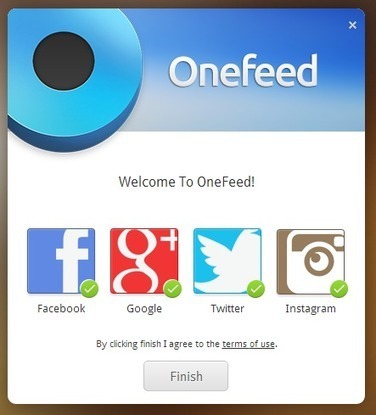
"Looking to get access to more information on your New Tab page in Chrome? With Onefeed you can add a custom newsfeed and get alerts from your social media accounts. Read this article by Nicole Cozma on CNET."
Robin Good's insight:
If you are looking for an effective tool to keep yourself update on your favorite web news, social media and RSS feeds this Chrome extension can provide an effective and free solution. From Cnet HowTo: "Newer versions of Chrome spruce up the New Tab page by adding some shortcuts to your most-visited Web sites or Chrome apps. A previous extension I wrote about, New Tab Page adds the weather, some headlines, and links to Chrome apps. Onefeed does all of this, plus a custom newsfeed and social media updates from Facebook, Google+, Twitter, and Instagram. You can also attach your Dropbox account, if you really want to. To get started, just install a copy of Onefeed for Chrome by visiting their Web site, then click the Get Onefeed button. You won't see a new icon appear, but you should see an alert from Chrome saying that the extension has been installed." Free to use. Try it out now: http://onefeed.me
Bart van Maanen's curator insight,
July 29, 2013 12:01 PM
Eerder schreef ik een artikeltje over alternatieven voor Google Reader (http://www.beeldbedrijf.nl/2013/google-nieuws/) maar OneFeed is dus ook een mogelijkheid als je Chrome als browser gebruikt.
Devadas's curator insight,
July 30, 2013 11:16 PM
Use Onefeed to replace your New Tab page in Chrome. With Onefeed you can add a custom newsfeed and get alerts from your social media accounts.
Robin Good's insight:
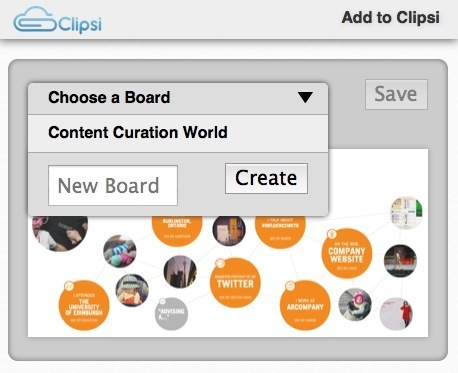
Clipsi is a free Pinterest-like content curation tool that allows you to clip text and images from any web page or local document and to organize them into collections and to share, publish and embed them easily on the web. A dedicated bookmarklet facilitates the clipping and capturing of new content "just-in-time". Collected content, just like on Pinterest can be titled and described, linked to other resources, but cannot be edited or tagged.
My comment: This content clipper and organizer is a Pinterest-look alike that is positioned for business users and which adds to the basic Pinterest-like image gathering functionality the ability to clip text sections from web pages or from local docs. More info: http://about.clipsi.com/ FAQ: http://about.clipsi.com/faq/ Example boards: http://about.clipsi.com/top-boards/
"Create curated social media slideshows in seconds with Brickflow."
Robin Good's insight:
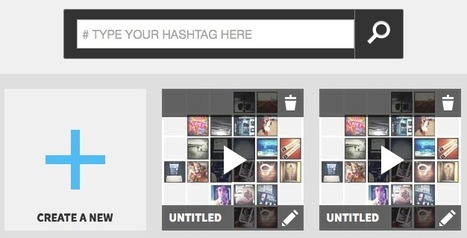
Brickflow is a web app which allows you to easly collect content from Twitter, Facebook, Instagram, Tumblr and YouTube and to package it up in a visual tile grid that can be viewed as a slideshow and which can be easily published, shared and embedded on the web. With Brickflow you can build a visua story either by collecting stories and resources using hashtags or by searching with the integrated facility across all the above listed social media and then dragging and dropping your selected items into your visual grid. Brickflow works in a similar way as Storify, providing though a different visual publishing metaphor for its final output. The final bundle looks like a visual grid of tiles, that can also be played as a presentation (also in full screen). From the official website: "Brickflow is an app for making curated social media slideshows in seconds. Build memorable stories and collections with content from Instagram, Twitter, YouTube, Tumblr and more. It’s just like playing with Legos. The result, a visual summary of a topic, can be embedded into any website or blog" Here is one good example: http://brickflow.com/landing/project/51d356739f252#/51d356739f252 More inspiring examples: http://blog.brickflow.com/ My comment: Very useful to curate visual summaries of breaking news stories, events or to summarize key resources to explore on a specific topic. Easy to use. Provides opportunity to remix existing "flows" into new ones. Free to use. Find out more: http://brickflow.com
Randy Bauer's curator insight,
September 14, 2013 7:03 PM
See my Brickflow example here: http://rbauerpt.blogspot.com/2013/08/start-lean-fitness.html
Robin Good's insight:
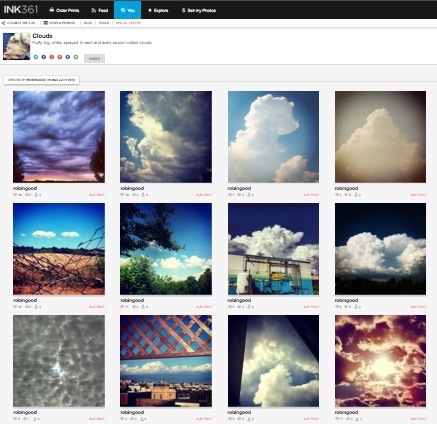
INK361 is a free web app which allows you to view, organize, filter and aggregate Instagram pics into "albums" that can be shared on all major social platforms as well as be embedded on any site or blog. At its basic level INK361 gives the opportunity to create a Gallery which contains all of your Instagram pics and which you can share as a web collection with anyone or embed in your site. When instead you want to create a "curated collection" of Instagram pics on INK361, you head to the "Albums" section and you specify a combination of @username and #hashtags (up to 5) that you want to use as filters. At this point INK361 aggregates for you all of the pics matching your specifications and gives you the tools to pick and select the ones you prefer, letting you position them in a digital album. Curated albums can be shared in one-click on Pinterest, Twitter, Google+, Facebook, StumbleUpon, and more, or you can choose to grab a highly customizable embed code for your site. My comment: While this is a web service clearly designed to support those looking to get some great prints from their Instagram pics, the "album" creation tool to curate, collect, organize and share/publish images from any account or hashtag while being able to manually pick, select and position it's really great and it's the first serious tool I have seen to do effective Instagram curation. Free to use. Find out more: http://ink361.com/ Example of a curated collection of my favorite clouds pics from my own account: http://ink361.com/app/#!/albums/robingood/clouds* Example of my embeddable Gallery: http://my.ink361.com/robingood *If you're not yet registered and you get an annoying dialog box obscuring your view, simply click on the last few words in the text notice that appears and, voilà, it will go away.
Jan Ankerstjerne's curator insight,
July 24, 2013 5:53 AM
The World of Social Media Gets Better and Better.
Ainhoa Martín Rosas's curator insight,
July 26, 2013 3:40 AM
Un curador de fotos de Instagram. Frikis de la fotografía, no os lo perdáis ;-) |
Robin Good's insight:
Martin Couzins and Sam Burrogh introduce in simple words the importance of curation and its relationship with their story and work. How do we get to the information that is really useful? How do we get to it quickly? A good introduction for beginners. 7/10 Original video: http://youtu.be/qxm9ElX4jaM Check also the related article: http://learnpatch.com/2013/08/how-content-curation-can-help-transform-workplace-learning/
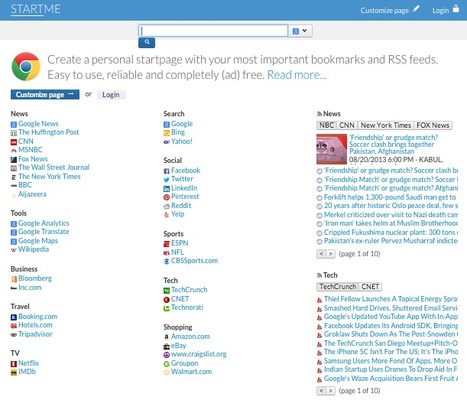
Create a personal startpage with your most important bookmarks and RSS feeds. Easy to use, reliable and completely (ad) free. Read more...
Robin Good's insight:
StartMe is an excellent free start page builder which allows anyone to create public (or private) start pages containing bookmarks, links and RSS feeds, organized in groups and easily editable. StartMe creates clutter-free, well designed and highly scannable editable start pages where you can easily add, edit, move around and re-order and group your favorite links and bookmarks in any way you want. You can create as many start pages as you want and you can choose to start either from a pre-populated links and feeds page that can be edited and customized or completely from scratch. Groups and individual items (links and RSS feeds) can be easily edited and dragged around easily. It is possible to decide how many news stories appear in a feed list and you can even switch on a "river of news" option that will combine chronologically all the news of a list of feeds. It is also possible to integrate a search engine for each start page that will search using your search engine of choice. StartMe supports OPML allowing full export and import functions with any bookmark collection or RSS feeds list. Extension for Firefox and Google Chrome are available. My comment: I can't recommend this tool enough. Easy, fast, effective and elegant. It's a breeze to use and it's so damn useful for creating start pages for a thousand different uses: tools lists organized in groups, suggested sites to visit subdivided in sub-topics, collections of people profiles in specific sectors, etc. Ad free. Free to use. Try it out now: http://www.startme.com/ Getting started: http://www.startme.com/page/help
JudyGressel's curator insight,
August 21, 2013 1:53 PM
Great for student and teacher ipad users to put everything in one place.
Breda Kansrijk's curator insight,
January 29, 2014 12:58 PM
Start me up! Word we like to hear. Save this page as a starting point. @leankansrijk #lean #startup #startXYZ
The battle for fair use is unfair to anyone who plays by the old rules and tries to share with the artists because human creatives can’t compete with the automated services that aren’t sharing with the artists.
Robin Good's insight:
Peter Wayner on Wired ponders the issue of fair use from a small, independent publisher point of view and asks some really good questions about what Google could actually do to encourage and reward those who create and bring new insight to the internet — not just those that remix it. He writes: "What if the researchers at these companies could improve their bots enough for the algorithms to make intelligent decisions about fair use? If their systems can organize the web and drive cars, surely they are capable of shouldering some of the responsibility for making smart decisions about fair use. Such tools could help identify blogs or websites that borrow too aggressively from other sites. The search engines that are crawling the net could then use that information to flag sites that cross the line from fair use into plagiarism. Google, for example, already has tools that find music in videos uploaded to YouTube, and then shares the revenue with the creators. ... The fair-use algorithms could also honor what the artist wants — for instance, some artists want to be copied. In these cases, a markup language that enumerates just how much the artist wants to encourage fair use could help provide that choice. That way, those who want rampant copying could encourage it while those who want to maintain exclusivity could dial back the limits." I can't but agree 110% with these suggestions. As a curator I feel that there is a strong need for policing fair use and for greater transparency by those who choose to re-use other people content. I am not for laws, and fines, but yes I am for tools that could tell me who is being fair in re-using and crediting / licensing other people's work, and who is not. Such tools could also motivate me to create more original visual work without fearing that other people would just steal it and re-use it as theirs. Excellent suggestions. Recommended. Good questions being asked. 9/10 Full article: http://www.wired.com/opinion/2013/08/some-arguments-about-fair-use-pit-humans-against-machines/
Asil's curator insight,
August 18, 2013 3:43 PM
I love the idea of fair-use algorithms, programmed to respect the meta-data tags of uploaded content.
Robin Good's insight:
zResearch is a curated, collaborative next-generation search engine, allowing great customization and filtering of results, clustering and auto-categorization, some truly stunning alternative data visualization options, and the ability to collaboratively curated and organize search results into multi-level collections. Once you are registered inside zResearch you can start immediately to curate your own "search spaces" in which you can save both any relevant results as well as any web page you run into on the web, by using the dedicated bookmarklet. Within a search space you can create as many folders as you like and multiple search sapces can be joined into "groups". zResearch offers two alternative ways to visualize results in visual clusters. One is a treemap-like display and the other is a circular diagram which make it very easy to see at a glance the forest(s) from the trees. Navigating among such different forests is extremely fast and easy and doesn't require a reload of the page. zResearch offers also the opportunity to invite other individuals to collaborate and contribute to a specific "search space" or "group", to make a search space private, or public, accessible by anyone and even embeddable elsewhere. In this fashion subject matter experts, trainers and guides can set up and maintain specific custom re-search spaces that can be used by anyone out there. zResearch offers also "alerts", which can monitor specific topics and keywords for you, and can search across texts, images, video, educational materials, books, products, the deep web and custom repositories. My comment: zResearch, brainchild of an already effective curated search engine named SearchTeam, is a truly effective, easy-to-use and useful search engine, which puts the re-searcher in fully in the drivers seat. The set of categorization, editing and search curation features is from my viewpoint very good and using zResearch to create a reference search space for other people interested in a topic is extremely valuable. I highly recommend zResearch to anyone interested in following, monitoring and maintaining an effective reference catalog of categorized info on any topic. Free to use during Beta. Try it out now: http://research.zakta.com/ More info on how to use it: http://research.zakta.com/help.php FAQ: http://research.zakta.com/faq.php Search space example I created: http://research.zakta.com/search_1_148_1673_Content_Curation?query=&type=Web+Sites&view=Map Video tutorials: http://research.zakta.com/video.php *Added to the "Search Curation" section of the Supermap of Content Curation Tools. Pricing: Sundar Kadayam, in response to a timely request by Marjolein Hoekstra has sent me this additional info about the cost of the service. His message reads like this: "...we are providing tailored versions of Zakta to enterprise clients to meet their specific needs. However, we are also working towards a major upgrade as well as a formal launch of the zResearch app this fall. Towards that end, we are bringing together a set of subscription options for individual professionals and small teams, to complement our enterprise offerings. These subscription options will be aggressively priced along the lines of successful online products like Basecamp, Evernote and others. People who are registering for a free trial of zResearch can continue to use that free trial until the subscription options are formally launched with the major product upgrade this fall. We will update the current zResearch site with this pricing and upgrade information shortly."
Luigi Cappel's comment,
August 19, 2013 3:46 PM
Look forward to learning more about the solution for individuals
Katherine Hanson's comment,
August 30, 2013 10:08 AM
I completely agree, Harish - always has been, always will be
Robin Good's insight:
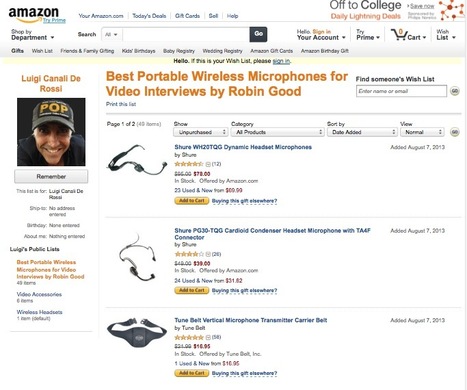
Using the Amazon Wish List system you can create easily lists of any kind of products that can be easily consulted, sorted, and shared with others. The Amazon Wish List offers a dedicated extension for Firefox, Chrome, Safari, Internet Explorer and for your IPad. Alternatively a standard bookmarklet is also available. My comment: An excellent alternative and complement to Amazon Collections which allows not just to organize and publish lists of Amazon products, but it extends this ability to any online shop. Wherever you are you can clip and collect any product into an Amazon Wish List. Ideally Amazon Collections and Wish Lists should be one thing and the best features of each merged into one facility. Wish Lists are less appealing visually but offer the opportunity to be viewed as compact lists (handy for large ones), to be sorted and filtered in a numbered of ways and to be printed. Something you cannot do with Amazon Collections. Free to use. Find out more: http://www.amazon.com/wishlist/universal/ref=cm_wl_xt_top_lm_ff_huc Here is a sample wish list of Portable Wireless Microphones I have recently created: http://www.amazon.com/registry/wishlist/1H58ZIB8Y5N1W/ref=cm_sw_r_tw_ws_MPTasb0JBVQBB
Urs Frei's curator insight,
August 10, 2013 3:26 AM
Amazon-Wunschliste mit portablem Audio-Equipment für Video-Interviews.
Robin Good's insight:
OnePlaylist.fm is a new web app which allows you to search YouTube videos and the full Spotify catalog for music tracks and video clips and to collect your preferred ones into shareable playists. You can also import existing playlists straight from YouTube and Spotify. Not only. Once you have created a playlist, you can synch it with your account on YouTube, Spotify, Rdio, Deezer and many other music services. Newly created playlists can be set to private or public. Public playlists can be shared on social media, embedded on other web sites, and are always published to a dedicated playlist web page that integrates a video player, all the clips in the playlist, related playlists, and a public analytics chart showing views and Facebook shares for that specific playlist. The service is powered by Spotify. My comment: Excellent video and music playlist maker. Powerful and speedy search function makes it easy to find any video or track and to arrange it into a publishable playlist. Excellent solution to create/curate valuable, unique and immediately useful content for your audience. Free to use. Try it out now: http://oneplaylist.fm/ Example of a published playist page: http://oneplaylist.fm/playlists/beach-house-chillout Video demo: http://youtu.be/VA96RiIwfyc *Added to Music Playlist Building Tools inside Content Curation Tools Supermap
The quality of content is of utmost importance to ranking. Content curation with enhanced annotations offers a way to post quality content and save time.
Robin Good's insight:
Here is an interesting research article reporting on the SEO effectiveness of curated content, and of the type of curation that is most effective from this point of view. Specifically, Virginia Nussey on BruceClay.com, wanted to find out if curated blog content could have the same SEO benefit as traditional blog content. To find out she run a specific test and measured the results. Here the conclusions she arrived at after runing the test: "When content curation comes in the form of original content, a website can achieve the benefits of fresh content without threat of negative search engine rankings. The same ranking potential can be gained from curated content with editorialized curation in significantly less time when compared to a traditional blog post." Key takeaways: 1. Text should be unique on the Web. 2. Sources linked to should be of high quality. 3. Add value to the collection, for instance through story-telling, new perspective or commentary. Informative. Instructive. Useful. 8/10 Full article: http://www.bruceclay.com/newsletter/volume112/seo-friendly-content-curation.htm

4JustToday's curator insight,
August 2, 2013 3:28 PM
200 word editorial is a real challenge for a coupon blogger. Thanks for the great article!
wanderingsalsero's comment,
August 3, 2013 12:33 AM
It's nice to finally see somebody validate the use of curation for SEO purposes.
AlGonzalezinfo's curator insight,
August 15, 2013 9:53 AM
Excellent scoop by Robin Good on a relevant and important article for Content Curators.
Robin Good's insight:
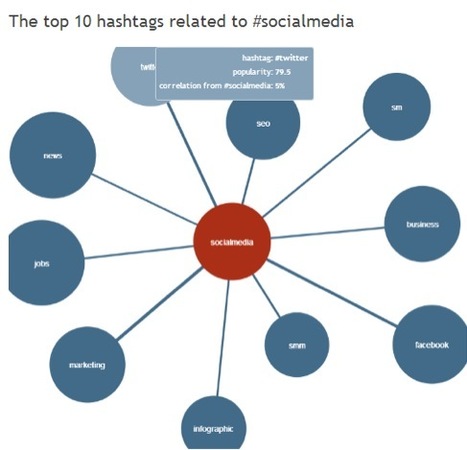
If you are looking for tools that can help you monitor, track and discover specific topics and issues on Twitter, here is a good selection of five free tools that you can use immediately to get a step ahead of everyone else when scanning Twitter news. The list includes: List and reviews: http://www.socialsamosa.com/2013/07/twitter-hashtag-monitoring-tools/ Related tools: http://hashtags.org/
Howard Rheingold's curator insight,
August 2, 2013 12:25 PM
Tracking hashtags can be part of an infotention dashboard, especially when researching particular subjects. As always, Robin Good finds, evaluates, and explains five tools for doing so.
Alfredo Corell's curator insight,
September 3, 2013 11:20 AM
A Hashtag, which is a simple organizational concept that allows people to organize their tweets, thoughts, and ideas around one topic (which is represented by a hashtag), has become so powerful that even Facebook has integrated this content and users’ discovery device in its platform, making it further valuable.
Easily combine multiple files into one professional, well-organized PDF Portfolio, including Word or Excel files, web pages, videos, and more.
Robin Good's insight:
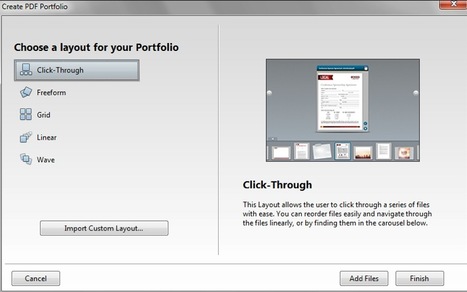
The professional version of Adobe Acrobat XI sports once again (it had been removed), a very useful feature for content curators of all kinds: PDF Portfolios. With Acrobat XI Pro Portfolio feature you can combine spreadsheets, web pages, documents, Flash videos, and more type of files in a rich PDF Portfolio which preserves in full the original document format and contents. You can easily re-arrange and order all of the included PDF in your preferred fashion and decide how the collection will be displayed (there are multiple modes available). You can also brand your PDF Portfolios with your company's logo, typeface, and identity graphics. Alternatively you can create your own look using Acrobat XI Pro built-in themes, layouts, and palettes. Available for both Mac and PC. Free 30-day trial available here: http://www.adobe.com/go/tryacrobatpro/ Pricing: $ 449 Find out more: http://www.adobe.com/products/acrobat/combine-pdf-files-portfolio.html
Robin Good's insight:
When you see someone re-posting "unedited and uncommented" 20 news stories to Scoop.it, Twitter and Facebook within the arc of just 60 minutes, and you see thousands of daily visitors checking that account, you start wondering, whether content curation is just a fad, a buzzword to sell more of the same, or whether those doing this have any idea that they are digging their own credibility grave too deep and early. Excerpted from Business2Community: "Having a frequently updated Twitter stream filled with interesting, engaging content from obscure sources that you contextualize is content curation, right? Not so fast. A curator isn’t just someone who can find great “stuff,” though it is an important skill. A curator is someone who creates a specific experience using found objects and contextualizes those objects within a limited space. A curator not only collects and interprets, but houses that work to create unique experiences." *Added to What Is Content Curation: Definition collection. Erica Ayotte writes about the growing friction between shallow content marketing practices sold as content curation (automated republishing of content across diverse social media channels), and what it really takes to stand out and provide a useful information service.
... What digital curation does include is hand selecting great content and often commenting or otherwise providing context or a unique perspective to accompany a piece of content. ... The Internet is a big place And those who point us in the right any direction are becoming increasingly valuable. By making the Internet smaller, focusing our attention, providing context, and creating relevant experiences, curators actually enhance our online experiences. Let’s hold curation up to the standard that it deserves and stop pretending that interesting tweets = content curation. This process takes time, skill, and creativity that should be recognized.
trendspotter's comment,
August 14, 2013 12:45 PM
Thanks! You mean collaborating on Scoop.it or on Flipboard? (it's possible there)
Maybe we can collaborate on a "apps" channel. But I really don't have much time and I wouldn't have the time to write such great insightful comments as you write all the time :( But I'm interested in working with you on a channel.
Robin Good's comment,
August 14, 2013 12:57 PM
Cristoph, thanks for your prompt and generous response. I meant only to congratulate you. (By the way: also Scoop.it allows to invite contributors to a channel).
Robin Good's insight:
Ashley Hutchinson has an excellent article on the NWP site, illustrating how content curation can be effectively used to move students from passively memorizing information that they have no interest into, to become active investigators of a topic to uncover its different facets and critical evaluators of the same in light of their own values. Her key goal was to find a way to make "research" something fun to do for her students. "I wanted students to be able to funnel their interests into a more authentic academic experience so that they could learn about what they want to learn about and become empowered as researchers, both casually and formally. To do that, I needed to remix their idea of what research is, transform it from something boring and arbitrary into something rich and useful. When I don't know something, I look it up... So I called this an "argument curation" project, and not just to sound fancy; they were actually identifying arguments and curating resources that helped inform those arguments." The beauty of this approach is that students need to check and research the different aspects of a story, to see it through and to develop their own viewpoint relative to it. And here is the a good example of how this can be achieved: "...They had to find the resources and think carefully about what the resources were actually saying, so that their collections contained diverse opinions and ways of expressing them. ...On their websites, they described the general topic, created page for five different arguments and gave a breakdown of why people are debating those topics. Then they had to set out to find resources, but not just any resources, resources that had different perspectives. Even those that were in contention with their own. After gathering at least three resources on five different argument topics within their area of interest, the students summarized the perspectives they saw in the diverse resources that they found. After being exposed to all of these resources and having some time to think, they themselves entered into the conversation by giving their opinion and referencing the sources that helped inform their opinion. By having a conversation with their resources, students found themselves **thinking** instead of repeating, synthesizing instead of summarizing."
I don't want to spoil any further your reading of the original which includes some inspiring info about the effects that such an approach can have on students and on their ability to look at the information that they are exposed to. Excellent resource for educators considering curation in their program. Insightful. Useful. 9/10 Full article: http://digitalis.nwp.org/resource/5227
Fiona Harvey's curator insight,
October 8, 2013 2:22 AM
Useful for educators - key digital literacy skill
johanna krijnsen's curator insight,
December 4, 2013 2:00 PM
content curation and critical thinking skills
Robin Good's insight:
Matt Cutts is head of Google's Webspam team and frequently writes and publishes video clips that help web publishers better understand how to avoid getting penalized and how to provide the best value to their readers and to Google needs. In this clip Matt answer the following question: "Many sites have a press release section, or a news section that re-posts relevant articles. Since it's all duplicate content, they be better off removing these sections (even with plenty of other unique content)?" (from Gus, MA) If you are interested in finding out what Matt Cutts thinks about content curation versus light re-sharing and republishing of other people's content here is a good video to watch. Good advice. Bottom line is "don't play smart, create value". 8/10 Original video: http://youtu.be/o7sfUDr3w8I (Thanks to Pawan Deshpande and B2C for their good pointer)
Giuseppe Lunardi's comment,
July 26, 2013 7:01 AM
What you say it's true, Robin. The Google Webspam Staff Manager confirms that, "Be yourself, don't copy!".
|
Your new post is loading...
If you use Chrome, you can collect several open tabs at once with this extension -- great way to save your place if you have to quite while in the middle of researching something, but also a good way to package disparate sources of information together.