


Content curation tools are in their infancy. Nonetheless you see so many of them around, there are more new curation tools coming your way soon, with lots of new features and options.


 Your new post is loading...
 Your new post is loading...
Your new post is loading...
 Scoop.it!
Content curation tools are in their infancy. Nonetheless you see so many of them around, there are more new curation tools coming your way soon, with lots of new features and options.
Robin Good's insight:
I have been testing and trying so many different content curation tools that I have been developing a good sense of what is needed most when it comes to searching, collecting, organizing and presenting information collections online. In this two-part article I have outlined what I expect to be the most relevant changes and innovations that will be likely integrated in the content curation tools already available out there or that will become the key foundations for new ones that are yet to appear. My article doesn't pretend to be a guide or a comprehensive catalogue of all the features that content curation tools should consider integrating, but simply an exploratory journey into some of the areas and features where I see a need for better support and where I expect to be surprised the most next. Follow me in this short journey and add to the comments what are your personal expectations and needs on this front. Full article: http://www.masternewmedia.org/content-curation-tools-future-part1/ 
Scoop.it!
Robin Good's insight:
Bullet Journaling is a simplified manual method to organize, plan and archive all of your most important life activities, meetings and things you want to do with just pen and paper. Forget Evernote or Asana, this is only for those who really crave for staying away from the digital tools - at least for this task - and who love to "curate" by hand their daily tasks and future activities, while maintaining a useful paper track of it all. I am one of them. As you can read on the Bullet Journal home page: "For the list-makers, the note-takers, the Post-It note pilots, the track-keepers, and the dabbling doodlers. Bullet journal is for those who feel there are few platforms as powerful as the blank paper page. It’s an analog system for the digital age that will help you organize the present, record the past, and plan for the future." Bullet Journaling, invented by Ryder Carroll, is a way to organize on paper your personal (or professiomal) life, not a way to "curate" your life or experiences. But it is from the keen ability to organize and put things in order that a curator can then extract and identify what has been of value and what not. For this reason I am looking at Bullet Journaling not jut as a way of curating your life priorities but also as a good example of the curator's best spirit and attitude:
The reference web site is a destination worth checking out. Made just of one long page, organized into sections, it offers a complete how-to manual on getting started immediately with bullet-journaling. Fascinating. Useful. Ingenious. 9/10 Find out more: http://www.bulletjournal.com/ Original video: http://youtu.be/GfRf43JTqY4 Check this review: http://www.fastcodesign.com/3016456/this-note-taking-system-turns-you-into-an-efficiency-expert

Beth Kanter's curator insight,
December 16, 2013 3:01 PM
I just discovered that one of the better curators is also a manual list maker. That is - not using the online tools to make to do lists, but writing it out on paper. I found that doing too much of my work online line - with hands on the keyboard and eyes on the monitor gets me into a distracted space. But, when I write down a list or the bullet points as this method points out. I'm all of sudden more focused! 
Sue Rizzello's curator insight,
December 18, 2013 12:48 PM
In the beginning there was paper. In between the to do list systems and GTD platforms, there was paper. All the productive people I meet have a strong affinity with paper lists and systems, even if they play fast and loose on occasion with Evernote et al. Could this chap have the answer? Well, I will give it a try, why don't you too. We have nothing to lose but the chaos.
Scoop.it!
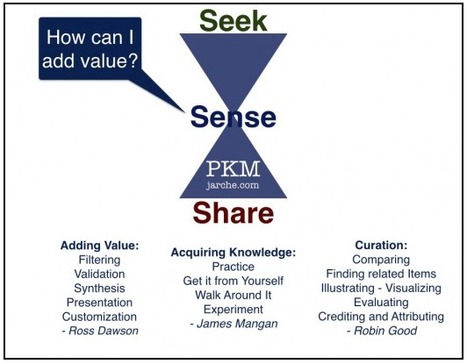
Thinking of adding value should be the first stage in curation, PKM, or any professional online sharing.
Robin Good's insight:
If you are curating content, whether for the purpose of personal learning, or for creating a useful public information resource, your very first objective should be how can you add value to the existing information that you are going to work on. Harold Jarche, does a wonderful job of explaining in simple terms what's the difference between sharing on social media, reposting or making your bookmarks public, versus the actual vetting and selection of each individual content item in light of the context and objective for which it is being curated. The cherry on the pie from the author is an invaluable synthesis and bringing together of related items from Ross Dawson, Maria Popova and me, that allows you to scan and see at a glance 14 different ways in which you can truly add value to whichever set of information bits you are dealing with. A great reference for anyone looking to improve the quality and value of its own curated work. Useful. Inspiring. 8/10 Full article: http://socialmediatoday.com/hjarche/1964106/ask-what-value-you-can-add

SyReach's curator insight,
July 7, 2014 4:53 AM
SyReach Notes now offers a full coverage of personal KM needs: Seek with integrated watch module and search engines, Sense with note and article edition, linking and knowledge building. Share by email or publish to Scoop.it selected resources linked to your articles!
Scoop.it!
Robin Good's insight:
"Zeeik It" is a new bookmarklet from Zeeik, a video curation app, that allows you to easily collect and save into discrete collections all of the YouTube videos found on Twitter or on most any web page. Zeeik video collections are a good way to create valuable content that can be embedded in any article or guide and that can be served according to multiple categories and criteria as you can see from this specific example: http://zeeik.com/zeeik/-21828800 (click "Cool Colors" or "Warm Colors"). You can find the new Zeeik It bookmarklet on the top right of the Zeeik home page here: http://zeeik.com/ Free to use. My previous review of Zeeik: http://sco.lt/7FPJXF More info: http://zeeik.com/

Lydia Gracia's curator insight,
November 30, 2013 3:28 AM
Zeek it est un outil dé curation de vidéos youtube. Grâce a sa bookmarklet vous pourrez créer des collections de vidéos prêtes a être insérées dans un post ou être utilisées sur d'autos supports. 
Dan Aldridge's curator insight,
November 30, 2013 12:36 PM
This is kind of like a ScoopIt for video curation on YouTube. More at www.Zeeik.com. Thanks for the heads from Robin Good! 
Prof. Hankell's curator insight,
December 2, 2013 8:33 AM
Robin Good's insight:
"Zeeik It" is a new bookmarklet from Zeeik, a video curation app, that allows you to easily collect and save into discrete collections all of the YouTube videos found on Twitter or on most any web page.
Zeeik video collections are a good way to create valuable content that can be embedded in any article or guide and that can be served according to multiple categories and criteria as you can see from this specific example:http://zeeik.com/zeeik/-21828800 ; (click "Cool Colors" or "Warm Colors").
You can find the new Zeeik It bookmarklet on the top right of the Zeeik home page here: http://zeeik.com/ ;
Free to use.
My previous review of Zeeik: http://sco.lt/7FPJXF ;
More info: http://zeeik.com/ ;
Scoop.it!
Living Stories provide a new, experimental way to consume news, developed by a partnership between Google, the New York Times, and the Washington Post. In Li...
Robin Good's insight:
Google Living Stories is an experimental project by Google that showcased (over a brief period between 2009 and 2010) how technology could be used effectively to provide a new, richer and more effective way to organize, serve and present news stories online. In the Living Stories model, each story is a stream that is continuously updated over time with new updates, additional stories, images, and other multimedia resources that are published over time. These are organized on the page in a way that provides maximum accessibility to the reader, allowing him to skim, explore, filter or dig in depth into any category or specific item. Nonetheless abandoned by Google, Living Stories remains a very inspiring example of how automated news aggregation and manual curation, both required in heavy doses to achieve this type of results, could provide a truly innovative mode of producing and offering access to news information. "The Living Stories code is available as open-source for anyone to use on their own sites at: http://code.google.com/p/living-stories/" Must see. 9/10 Free to study, use and adopt. More info and examples: http://livingstories.googlelabs.com/ WordPress plugin: https://code.google.com/p/living-stories/wiki/WordpressInstallation
Scoop.it!
Curation is nothing new, but online content curation is still in its early stages. Many content marketers are still unsure about what constitutes ethical content curation. If you're in this group, ...
Robin Good's insight:
If you are curating content with the idea of saving time, posting more content and getting away with more traffic, greater visibility and ranking in Google, or if you are using some cheap content marketing tactics sold to you as "content curation" you probably don't even care whether what you are doing is "ethical" or not. Content curation is an ethical activity by definition, as it requires you to study, analyze, dissect, find patterns and relationships and to distill, personalize and contextualize them for your readers / viewers, while fully crediting and attributing all sources and relevant references. Everything else, and that is the majority of what is promoted and created in the name of "content curation" around the web nowadays (by the very companies producing many of these content curation tools), is not unethical. It's valueless. There's not any such thing as unethical loving. If you love something, you do. If you want to "curate" something, you do not go for quantity or automation. If you are looking for insight, you don't need tools to expedite or automate. You need deep competence, personal interest and passion for that topic, as well as time to research and collect relevant info to curate. There's no technology that can replace or augment that. You can augment the search, the finding and collecting, but you can't automate the ability to see beyond the surface, to scan and recognize patterns or to find great parallels with other stories. The problem in fact arises only when someone teaches or markets to you the idea that by "loving" (or by "curating") something you can get certain benefits you crave for. From that moment on your idea of "love" (or curation) will be a corrupted, wrongly conceived idea for what love is. Pawan Deshpande, founder of Curata, illustrates in this useful article the fundamental aspects that characterize true "content curation" from other cheap content marketing techniques which work only to: b) dissipate your potential value c) create opportunities for the true content curators to visibily stand out. Rightful. Valuable advice. 7/10 Full article: http://contentmarketinginstitute.com/2013/11/ethical-content-curation-checklist/ Check also: http://www.masternewmedia.org/what-makes-a-great-curator-great (Image credit: Justice blindfolded by Shutterstock)
Scoop.it!
From the Haiti earthquake to Hurricane Sandy, check out how Team Rubicon uses Tour Builder to document the disaster relief missions that have taken them arou...
Robin Good's insight:
Google Tour Builder is a new web app which allows you to create visual stories that integrate maps, location pins, routes followed, texts, images and video clips into a shareable content bundle. You simply log in with your Google account into GTB and you can start immediately building a tour by identifying specific spots on the world map and by providing additional information to build your story. Completed tours (which are set to private by default) can be edited at any time and can be publicly shared and viewed by anyone with a web browser. N.B.: Currently, Tour Builder requires the Google Earth plugin which is only available for Windows and Mac OS X 10.6+. While tours can't be viewed on mobile browsers, they can be accessed using the Google Earth App, which is available for Android, iPhone/iPad, and Linux. My comment: An excellent new experimental tool from Google which can provide great benefit to those in need to showcase, present and divulge their projects, journeys, or tourism-related itineraries. Free to use. Try it out now: https://tourbuilder.withgoogle.com FAQ: https://tourbuilder.withgoogle.com/about/faq Gallery of examples: https://tourbuilder.withgoogle.com/gallery#

Josette Williams's curator insight,
November 22, 2013 11:39 PM
Bringing your stories to your tribe, your mission, your projects, your pursuits around the world through Google Tour Builder! 
Intriguing Networks's curator insight,
December 8, 2013 7:38 PM
Useful tools why reinvent the wheel, better to leverage? 
Lila Hanft's curator insight,
December 9, 2013 9:24 AM
A content creation tool with a lot of potential.
Scoop.it!
Robin Good's insight:
SpecificFeeds is a free web app which allows you to provide the opportunity to your RSS readers to subscribe only to the type of news and stories they are interested into by allowing them to select tags, keywords and authors they want to read about. You simply submit your RSS feed to SpecificFeeds and the service automatically creates a web page and an icon that you can share or publish on your website to help those that want to subscribe to your news, but who prefer to pre-select topics, tags or authors they like to see. My comment: SpecificFeeds acts as a RSS filtering and distribution service providing a useful benefit to those using it. Just like on Twitter (until Custom Timelines) the fact that you subscribe to an author or a web magazine, doesn't mean you want to read everything she posts. SpecificFeeds helps both web publishers and readers reduce the noise and increase the signal when using RSS feeds. Free to use. Try it out now: http://www.specificfeeds.com/ Here is my "specific feed" that you can customize: http://www.specificfeeds.com/robin-good-sharewood-news

malek's curator insight,
November 17, 2013 5:56 PM
Worth a try, easy to customize was my first impression 
Stephen Dale's curator insight,
November 18, 2013 9:11 AM
A useful app for syndicating RSS content using tags, author or keywords. Fills a gap in the market for this type of functionality (not available in Feedburner) and nice to see that some people still see RSS as a viable means of consuming information.
Scoop.it!
Robin Good's insight:
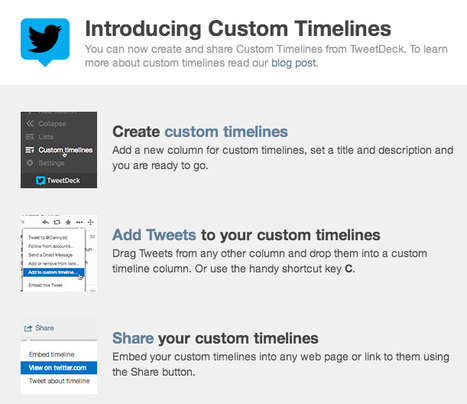
Twitter has just announced the availability of a new feature that will be gradually rolled out to all Twitter users and which allows you to create custom curated Twitter channels on any topic you want. But you need not wait. To start using immediately Twitter Timelines what you need to do is to head over to https://tweetdeck.twitter.com/ and to register yourself for the free web app owned by Twitter. Once you are logged in, all you need to do is to click on the leftmost vertical icon-bar on the + sign, and then to select Create Custom Timelines from the ensuing dialog box. Once you have created a Custom Timeline all you need to do to populate it is to manually drag tweets from your others news/tweets gathering columns into it. Once created in Tweetdeck any Custom Timeline is immediately visible inside Twitter at a dedicated URL and can be easily shared or embedded inside any site or blog. My comments: The Twitter Custom Timelines feature opens up a universe of possibilities for curated news channels, and other highly specialized thematic channels. Finally there is the opportunity not to have to consume stories and news that are completely irrelevant to your interests simply because they come from someone you follow. By following highly specific custom timelines it is now possible to consume only the type of content you are truly interested into from your favorite trusted curators. Free to use. Try it out now: https://tweetdeck.twitter.com/ Check also: https://blog.twitter.com/2013/custom-timelines-in-tweetdeck
Stephen Dale's curator insight,
November 14, 2013 12:47 PM
Hoping this facility will soon be available to use on aggregators other than Tweetdeck (which I don't use). Looks useful, particularly for themed storytelling. #socmed #curation 
Dean Mantz's curator insight,
January 1, 2014 12:40 PM
I realize this is old news but it is still relevant and new to a large number of teachers and pre-service students.
I would also recommend folks to follow Robin Good's scoop.it site for a vast array of curation tools and resources.
Scoop.it!
Robin Good's insight:
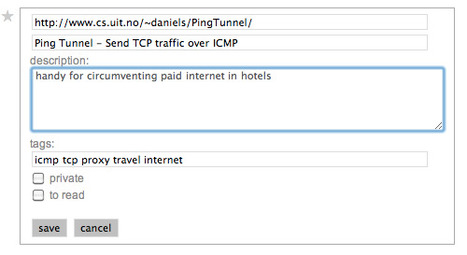
Pinboard is a social bookmarking service which allows you to easily save and organize any number of links, with no limits on text descriptions. Pinboard is characterized by having a no-frills, simple interface, by being very speedy and reliable and by being able to import, sync and export all of your links easily. Pinboard integrates also a powerful web caching and indexing feature available to "pro" accounts ($25/year) which allows you to keep a full cached and searchable copy of any bookmark you save. Advanced edit tagging, filtering and bundling features make it easy to oganize and find links even inside very large collections. Links saved can be set to be public or private. All of the bookmarks saved inside Pinboard can be easily exported in a standard file format. A set of basic APIs is also available. You can import all your existing bookmarks from Delicious, Google Bookmarks, Diigo, Firefox, Safari, and many other sources by following the instructions on the howto page. A very useful feature called Tab Sets allows to quickly save all of your currently open browser tabs to Pinboard having the unique advantage of being able to re-open them even if you're on another machine or in a different browser. N.B.: The site has a unique and now proven business model and is entirely self-funded. Ad-free. My comment: Excellent bookmarking service for anyone in need of a no-frill, reliable and fast tool. The archiving feature is particularly valuable as well as the auto-syncing with multiple services (Instapaper, Read It Later, Twitter. Delicious). The service has a one-time fee of around $10. Check it out here: https://pinboard.in/ *Switch from Delicious (why): https://pinboard.in/switch/ *must-read Tour: https://pinboard.in/tour/ HowTo: https://pinboard.in/howto/ More info: http://pinboard.in/about/ *Added to the Permanent Page Archival Tools section of Content Curation Tools Supermap.

ghbrett's curator insight,
November 7, 2013 8:48 AM
Thanks Robin for your usual very in depth review of the article. See below!!
ghbrett's curator insight,
November 7, 2013 8:50 AM
Thank you Robin for your usual very in depth insights! See his comments below.
Scoop.it!

Online journal dedicated to showcasing the most interesting and unusual out-of-copyright works available on the web
Robin Good's insight:
The Public Domain Review, a project of the Open Knowledge Foundation founded by Adam Green and Jonathan Gray, is a free online journal collecting and showcasing the most interesting and unique copyright-free works available on the Internet. The Guardian reports: "...the site and its newsletter showcase the best and quirkiest texts, images and films the internet has to offer. ...A model of digital curation." The mission of the PDR is to "celebrate and showcase online material which is openly licensed, and thus free for people to share and re-use for any purpose". My comment: A treasure trove of unique, rare and valuable pieces of content organized in helpful collections. A gate to discovery of otherwise unfindable gems. Free to use. Check it out now: http://publicdomainreview.org/ More info: http://publicdomainreview.org/about/ Collections: http://publicdomainreview.org/the-collections/ Newsletter: http://publicdomainreview.org/subscribe/ Key content sources: http://publicdomainreview.org/sources/

flea palmer's curator insight,
May 21, 2014 6:31 AM
A fantastic resource comprising of artworks, essays, audio and books. You can also subscribe to the Public Domain newsletter to find out what has recently been featured. 
Lara N. Madden's curator insight,
May 21, 2014 2:39 PM
This could be a great resource for both educators and students.
Scoop.it!
Robin Good's insight:
Fest300 is a great example of content curation at work. The site is a gateway to the most interesting festivals around the world, organized into several categories, from art and performance events, to music, health, food and religious celebrations. For each selected festival a dedicated info-page curated by founder Chip Conley provides detailed info about the event, the location, accomodation and driving info, key takeaways, photos, video clips, ratings and things to pay attention to. Social comments provide also additional valuable info. An excellent resource for world travellers, and a fantastic curation example to inspire web publishers and passionate entrepreneurs alike. Free to use. Check it out now: http://www.fest300.com/worlds-best-festivals

Zoé Dmn's curator insight,
March 10, 2015 11:23 AM
Les meilleurs festivals au monde... Liste, présentation et photos...
Scoop.it!
Robin Good's insight:
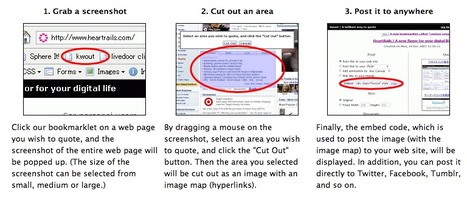
Kwout is a web app that allows you to grab any portion of any web page, including text and images and to easily post it on your site, blog or on your preferred social media channel. To use Kwout you install a Firefox add-on or the Chrome extension and whenever you see content you want to "quote" you click the Kwout button and then you select the part of the page you want to quote with your mouse. At this point you can select whether to share, tweet or embed your selected quote whereever you like. A unique feature makes it possible for all of the links contained in the part of the page you grabbed to remain fully active and clickable. Kwout archives also all of the "quotes" you create and can auto-generate a page that shows your history of cited content. P.S.: This is not a new tool and it has not been updated since 2011 but it is still working fine. Free to use. Try it out now: http://kwout.com/ Firefox add-on: http://kwout.com/help/addon Chrome extension: http://kwout.com/help/extension Added to the Content Curation Tools directory page here: https://contentcuration.zeef.com/

Carlos Bisbal's curator insight,
October 31, 2013 2:10 PM
Captura cualquier parte de una página Web o post para incrustarla en cualquier lugar con Kwout
Kwout es una aplicación web que te permite capturar cualquier parte de cualquier página web, incluyendo el texto y las imágenes y te permite publicarla fácilmente en tu sitio, blog o en su canal de medios sociales preferido. Para utilizar Kwout debes instalar un complemento o extensión de Firefox o Chrome y cada vez que veas algún contenido que deseas "citar" debes hacer clic en el botón "Kwout" y luego seleccionas la parte de la página que deseas capturar con el ratón. En este punto puedes seleccionar si deseas compartir, tweetear o si deseas integrar la cita seleccionada en el lugar que prefieras. Una característica única hace posible que todos los enlaces contenidos en la "captura" permanezcan en plena actividad y te lleven al lugar indicado al hacer clic. Al mismo tiempo todas las "citas" y archivos que crees con Kwout pueden generar automáticamente una página que muestra el historial de los contenidos citados. PS: Esta herramienta no es nueva y no ha sido actualizada desde 2011, pero todavía está trabajando muy bien. De uso libre. |
Scoop.it!
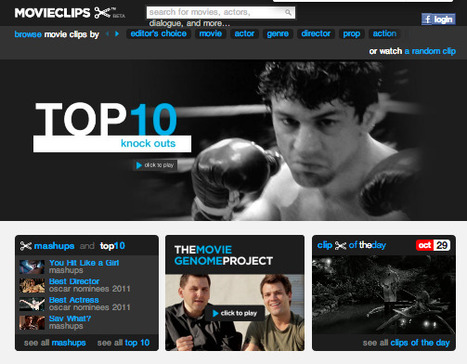
MOVIECLIPS.com has movie trailers, previews, behind the scenes clips of old, new and upcoming films. Find videos of your favorite actors, actresses, scenes or watch clips of movies by producer, director or cast.
Robin Good's insight:
Movieclips.com is a curated collection of the best movie clips and trailers from thousands of films tha can be re-used, edited, legally shared and embedded on any web site. It is possible to search or browse the huge film clips catalog via a rich number of pre-set categories ranging from actors, to directors, move title, and many more. by a wide number of categories all of the films available If you are looking for a specific movie quote, Movieclips can be invaluable in finding that memorable scene that would do perfect to complement your research or communication project. If you search for a specific theme or word (e.g.: freedom) you can get instantly a list of films that include clips that cite that theme and provides all of them for immediate access. Any available video clip is available in most cases in both SD and HD video quality, and it is possible to "trim" it to keep only a specific segment to be republished. A simple visual editor allows you to drag clip markers to establish the start and end of the part you are interested in. Any clip, can be shared directly to all major social media channels or embedded in a customizable player on any web site or blog. Moveclips also has curated a gallery of Mashups, a TOP10 of the best clips available. From any film clip you can access a relevant link to Netflix, Amazon or iTunes to buy, rent, purchase or stream that movie. Movieclips is available online since 2011 but it looks like it is not being updated anymore. No registration or login required. Free to use. Try it out now: http://movieclips.com/ See what others have to said about Movieclips: http://movieclips.com/about/press/ More info: http://movieclips.com/about/team/

Annika McGinley's curator insight,
December 19, 2013 11:45 PM
I'm always asked by academics about the copyright implications... 
Víctor Alarcón's curator insight,
February 23, 2014 3:10 PM
Amazing catalogue of film clips which can be shared & embedded
Scoop.it!
Robin Good's insight:
Back in Feberuary of this year Debbie Millman has interviewed Maria Popova, the curator of Brain Pickings, Literary Jukebox and the inventor of Curator's Code. Find out what Maria thinks curation is all about (How do we make sense of the world we through stuff and through objects - whether physical or metaphysical) and why she has become so interested in it. Maria is a fantastic and highly prolific content curator producing three original posts and between 60 to 70 tweets a day. Specific interview points I suggest you listen to: -> 24':30" for combinatorial creativity and the first recorded examples of content curation as a form authroship -> 27':16" Curation - Do you define yourself a curator? -> 28':00" Curators don't design, they organize -> 28':50" What is curation -> 29':19" Curation and pattern recognition -> 37':45" The importance of discovery - why attribution matters Source: http://chipkidd.com/journal/?p=4566 Original audio interview: https://soundcloud.com/designmatters/maria-popova (duration: 52':07") .MP3 audio download: https://api.soundcloud.com/tracks/75217989/download?client_id=0f8fdbbaa21a9bd18210986a7dc2d72c More interesting interviews: Design Matters Podcast
Scoop.it!
Robin Good's insight:
Docubase is a project of the MIT Open Documentary Lab that aims to create a collaborative, participatory community around a growing collection of innovative documentaries curated by experts and outsiders alike. Documentaries can be searched and sorted easily in a number of ways (most recent, most viewed, alphabetical order / or as a list rather than a mosaic). The interface is slick, colorful and simple to use. More than 140 documentaries are already available and a selected group of curators has put together a number of publicly available playlists designed aroound key themes connecting these clips. Playlists: http://docubase.upian.com/playlist/ The curators: http://docubase.upian.com/curator/ A fantastic resource for documentary lovers and a great example of how in an open and participatory project, curation can play a fundamental role. Free to use. Try it out now: http://docubase.upian.com/ More info: http://docubase.upian.com/about/ Suggest projects to be included: http://docubase.upian.com/contact/ Read more about it: http://opendoclab.mit.edu/docubase_conversation #mitdocubase

Kimberley Vico's curator insight,
December 8, 2013 2:41 AM
Incredible documentaries... something for everyone...!
Scoop.it!
Robin Good's insight:
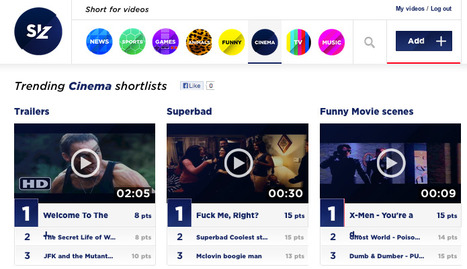
Siz.io is a free web app which allows you to collect your favorite video clips into thematic "shortlists". Shortlists are organized into main categories ranging from News, to Animals, Games, Funny, Cinema, TV and more. You can add video clips from YouTube, Vimeo, DailyMotion, Instagram, Vines and more by simply copying and pasting their URLs.
Free to use. Try it out now: http://siz.io/ Added to the section: Video Curation of the Content Curation Tools Supermap
Scoop.it!
Robin Good's insight:
The Discipline of Organizing is a book, published by the MIT Press that offers a framework for the theory and practice of organizing anything. A short, 7-page PDF synthesizing and introducing the book main ideas has just been published as part of the latest Bulletin of the Association for Information Science and Technology (Vol.40- N.1). The PDF, as well as the book, have been authored by Robert G. Glushko (who teaches in the School of Information at the University of California, Berkeley) and, as I mentioned, are devoted to introduce the relevance of the TDO (The Discipline of Organizing) to anyone involved in organizing and maintaining content archives or in curating any type of digital content online. "A set of resources is transformed by an organizing system when the resources are described or arranged to enable interactions with them. Explicitly or by default, this transformation requires many interdependent decisions about the identities of resources; their names, descriptions and other properties; the classes, relations, structures and collections in which they participate; and the people or technologies that interact with them. These decisions and the analysis needed to make them have been systematized in The Discipline of Organizing, recently published by MIT Press in both print and eBook formats." The PDF provides a good starting point to start asking the right questions needed to develop an organizing framework and to understand why they are so relevant. "A very practical implication of teaching organizing using more generic concepts and vocabulary is that it enables students to obtain jobs with firms that might not otherwise hire them. My comment: Useful for defining an organizing framework for anyone new to doing it. Could be more pragmatic and example-rich. 6/10 Original PDF: http://www.asis.org/Bulletin/Oct-13/OctNov13_Glushko.pdf Book: http://www.amazon.com/The-Discipline-Organizing-Robert-Glushko/dp/0262518503

Gilbert C FAURE's comment,
November 24, 2013 2:01 PM
more than only rescooping, I would like to say that it is the challenge of every scientist, researcher, MD, and particularly university teacher who has to surf on waves of information. Curation, and especially scoop.it helps to keep abreast and more importantly to organize or at least to save and find again what has been collected in the cloud!
Scoop.it!
Robin Good's insight:
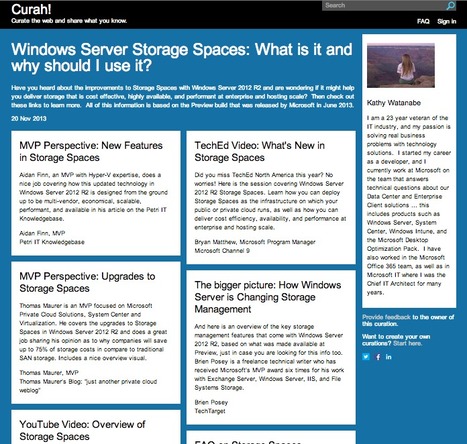
Curah! is a new site focusing on curating the best tech answers available online. Targeted mainly at developers, the new Microsoft information portal has been designed to provide curated answers on topics ranging from high-level technology descriptions to deep technical articles covering specific problems that developers commonly face. By exploring the home page you can already find a set of gret examples of curated answers in which a Microsoft trusted expert has collected a set of artcìicles and online resources highly relevant to a specific topic. "We’ve developed Curah! as a way to help customers discover great technical content. Curah! has a very specific purpose: to help people searching in Bing or Google find annotated collections of great content that specifically target common user questions." My comment: A great example of the value that content curation can provide to customers, developers as well as to the public at large. The choice of starting the site with great examples to follow-up on is also the best possible approach to guide and train future contributors on what is expected of them. A great model for the many specialized curated answer sites that will spring up in coming years.
Free to use. Check it out now here: http://curah.microsoft.com/ FAQ: http://curah.microsoft.com/32226/curah-frequently-asked-questions
Scoop.it!
Robin Good's insight:
Here is a great example of how the spontaneous content curation efforts by individual users of a marketplace can provide significant benefits both to the marketplace sellers as well to all buyers. On ThemeForest, which is one of the largest and best catalogues of web site themes and designs, you can find an endless number of curated collections of templates, image sets, presentation decks and others resources (like video footage or soundtracks) for publishing quality content on the web. In fact, there are so many of them that the main problem for whoever goes to shop there, is the time needed to search and find what may best fit his needs. But thanks to a community feature called "collections", any registered user can collect and organize individual themes found on ThemeForest into individual collections which can be shared with everyone publicly (or kept private). Here some great examples:
The ensuing benefit for the users of the marketplace is the ability to find more rapidly valuable items within the ocean of options available. As a consequence also whoever runs Themeforest benefits from more sales and less time spent by new buyers in finding what they are looking for. But there's more. Since ThemeForest is part of a larger network of design resources that includes video assets (VideoHive), graphic resources (Graphic River), design apps (CodeCanyon) and several others, the collections can and do often include assets coming from the other sites of the network facilitating serendpitous discovery for buyers of other useful products. Finally, individual merchants selling on the Envato network can curate their own collections showcasing their best work according to specific uses and applications. A great example of how curation can significantly help online sales in situations where there is a very large number of products or services on sale. Check it out now: http://themeforest.net/collections
Scoop.it!
Robin Good's insight:
Mammoth is a web app which allows you to easily grab, collect and organize any content you find on the web. From text, to images and video clips, can be easily dragged and dropped into the vertical sidebar widget called Mini-Mammoth and placed into different collections called "boards". . Boards can be set to be public or private. 5 GB of free space available for every new user. For every person you refer you get an extra GB. Can invite others to collaborate with you. . My comment: Good tool to collect and organize stuff that you need for your own projects and interests. Differently than similar tools it offers a full text and content editor to enrich, complement and annotate boards with original stuff opening the way also to learning and educational purposes. . Free to use. . Try it out now or request an invite: https://mammothhq.com/ . Chrome extension: https://chrome.google.com/webstore/detail/mnodmjdgoadhalodifblaaikgcfgchfb . Find out more: https://mammothhq.com/how_to . More video clips: https://www.youtube.com/user/MammothSupport/videos .
Carlos Bisbal's curator insight,
November 16, 2013 10:11 AM
Buena herramienta para recopilar y organizar todo el material que puedes necesitar para tus proyectos e intereses. A diferencia de otras herramientas similares, esta ofrece un completo editor de textos y un editor de contenido para enriquecer, complementar y hacer anotaciones con material original. También deja abierto el camino de su uso para el aprendizaje y los fines educativos . 
Anne Méner's curator insight,
November 17, 2013 5:34 AM
Paraît simple à utiliser pour un premier travail de collecte d'information. 
Georges Millet's curator insight,
November 18, 2013 5:58 AM
If you look for new ways of curating all information you processed, an other alternative to Evernote ...
Scoop.it!
Robin Good's insight:
Triggable is a new web abb (currently in alpha) which allows you to monitor mentions of specific people, events or topics across your favorite news and social media channels. You select your favorite sources both from within a pre-selected pool of quality news channels as well as by adding your favorite RSS feeds. Triggable collects relevant mentions, collects them and optionally alerts you via email. My comment: Interesting and promising alternative to the likes of Google and Yahoo Alerts (and Talkwalker Alerts), and to the new cool kid on the block: Mention. Free to use. Try it out now: http://www.triggable.com/ (Image credit: Tech background by Shutterstock)
Scoop.it!
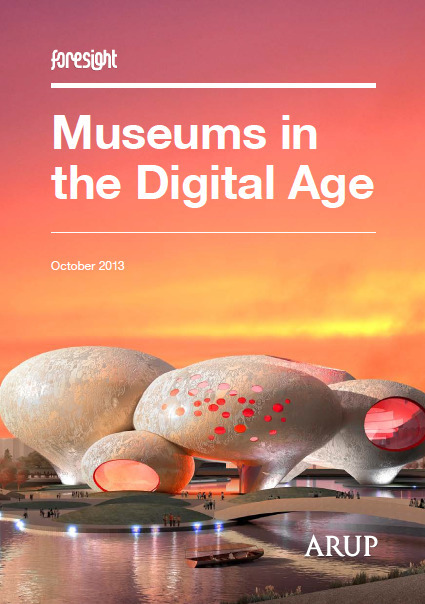
This report highlights a number of key trends that will have a significant impact on the user experience and design of future collections and museums.
Robin Good's insight:
Picture these scenarios:
These, according to the 40-page report “Museums in a Digital Age” from Arups, may actually be some of the likely new profiles of prestigious museums 25 years from now. The report projects that: "...future museums will see personalised content, new levels of sustainability and a visitor experience extended beyond present expectations of time and space."
Source: http://futureofmuseums.blogspot.it/2013/11/museums-in-future-view-from-across-pond.html The idea of "collaborative curation" of museum collections by the actual users-visitors, is particularly fascinating. "Just as current consumer trends shift towards collaborative consumption, in the future, museums may employ new patterns of collaborative curation, allowing for individually curated experiences and giving the public greater control over both content and experience. Increased visitor participation will allow people themselves to reinvent the museum experience, enabling content that can adapt to the preferences of users in real-time." My comment: If you are a curator and are interested in exploring and understanding what the future of large collections and museums may look like and which forces are going to be driving such changes, this is a good report to read. Insightful. Inspiring 8/10

Jennifer Moss's curator insight,
November 8, 2013 6:47 PM
This is like the 'Horizon Report' for museums. 
Erica Bilder's curator insight,
November 15, 2013 7:11 AM
I have nothing to add to Robin Good's terrific insights: Robin Good's insight:
Picture these scenarios: The Freud Museum, in the spirit of its namesake, becomes a provider of mental retreat and therapy (I wonder if the docents will be licensed psychoanalysis?) These, according to the 40-page report “Museums in a Digital Age” from Arups, may actually be some of the likely new profiles of prestigious museums 25 years from now.
The report projects that:
"...future museums will see personalised content, new levels of sustainability and a visitor experience extended beyond present expectations of time and space." A rising desire among audiences to shape their own cultural experiences (“Collaborative Curation”) The opportunity for museum to become “curators of experiences” that extend beyond the boundaries of traditional exhibits or programs, or beyond the walls of the museum itself.
Source: http://futureofmuseums.blogspot.it/2013/11/museums-in-future-view-from-across-pond.html ; The idea of "collaborative curation" of museum collections by the actual users-visitors, is particularly fascinating. "Just as current consumer trends shift towards collaborative consumption, in the future, museums may employ new patterns of collaborative curation,allowing for individually curated experiences and giving the public greater control over both content and experience.Increased visitor participation will allow people themselves to reinvent the museum experience, enabling content that can adapt to the preferences of users in real-time."
My comment: If you are a curator and are interested in exploring and understanding what the future of large collections and museums may look like and which forces are going to be driving such changes, this is a good report to read.
Insightful. Inspiring 8/10
PDF: http://www.arup.com/~/media/Files/PDF/Publications/Research_and_whitepapers/2013_Arup_FRI_MuseumsintheDigitalAge_final_web.ashx
Scoop.it!
Robin Good's insight:
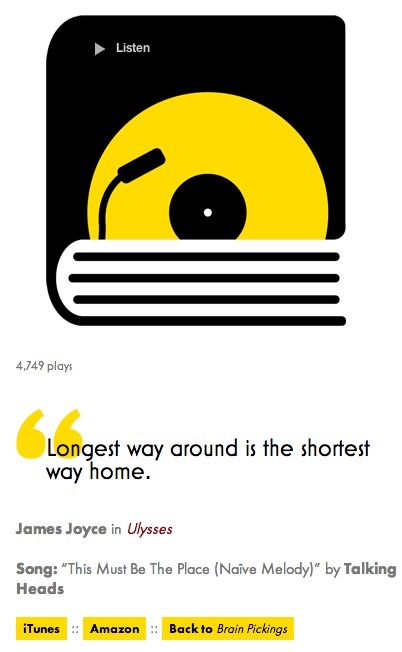
Maria Popova is the author of Literary Jukebox, a fascinating collection of daily quotes from her favorite books, each one thematically matched to a song. She writes about it: "Sometimes, the connections will be fairly obvious. Other times, they might be more esoteric and require some reflection." Literary Jukebox is truly a work of love and a great example of how curating something you truly enjoy, can create permanent value, while providing cultural insight, an opportunity for music discovery to the reader as well as exposure and visibility to the books and music authors included. N.B.: I encourage you to support Maria's work, as she is a brilliant and inspiring mind and her work on Brain Pickings is a clear demonstration of someone whose work benefits no big brand, advertiser or sponsor, but the likes of you and me and our ability to remain curious.
Get inspired: http://literaryjukebox.brainpickings.org/ See also: http://www.brainpickings.org/index.php/2012/08/09/introducing-literary-jukebox/ Check out Brain Pickings on Twitter: Consider subscribing to the email newsletter digest. Here's a sample issue on how to worry less about money, timeless advice on courage and the creative life, why going back to school is a bad idea, and more.

M. W. Catlin's curator insight,
November 4, 2013 12:55 PM
Really nice way to combined a couple of my favorite things, music and literature.
Scoop.it!
Robin Good's insight:
Even though Google has become very good at understanding and providing relevant results for many popular queries, many search users are getting lazy and taking those results as currency. John Ball writes on Search Engine Land: "People don’t think, analyze, or really even understand how search works anymore. They just assume it will work and they’ll get the results they need. This is a very real trend, and likely to continue." And he goes on: "For example, consider Google Now — no searching required, just results you’re likely to need and can further refine. Also, consider Google Glass. Glass doesn’t even support advanced searching — it’s all short, to-the-point answers, likely based on the Knowledge Graph, which is rapidly expanding." If you are a journalist, researcher or content curator, you are likely uninterested in such auto-selected results and prefer to dig, explore more and vet before drawing a conclusion. To go beyond the surface of Google forcedly limited search spectrum, it is of great help to be able to use Google search modifiers. These are manual commands that you can insert in your search queries and that allow you to ask to Google to bring you the results you want in the way you want it. If you are not familiar with these or have not been using them in a while, I do suggest to scan through them again as they can be real life-savers in many a situation. Very useful for any good journalist, researcher or curator. Useful. Good examples. 8/10 Full article: http://searchengineland.com/top-10-search-modifiers-why-they-matter-what-they-are-how-to-use-them-173343

Maureen Greenbaum's comment,
November 5, 2013 7:55 AM
I left this comment I think you are wrong about AND - that is Google's default<br>see https://support.google.com/web...<br>You need OR if you want either term but Google does AND automatically otherwise<br>@sumware
|
















Las herramientas de curación de contenido están en su infancia. En un futuro próximo van a jugar un papel cada vez más importante de apoyo a la producción de contenidos, la educación y el aprendizaje y, en general, a la organización de forma mas eficaz de la información online y offline disponible.
Para lograr estos objetivos, las herramientas de curación de contenidos tendrán que probar, integrar y adoptar nuevas características que cumplan con muchos de los requisitos de un curador de contenidos.
Interesting write up on content curation tools from Robin Good (pt. 1)
Artículo de Robin Good en el que habla de las posibilidades de las herramientas de content curation.